Claude Code Audit Command: How to Find and Fix Stale Prompting Patterns in Your CLAUDE.md and Skills Files
Claude Code audit command scans your CLAUDE.md for stale prompts, outdated patterns, and prompt debt—so you can fix what's quietly hurting output quality.

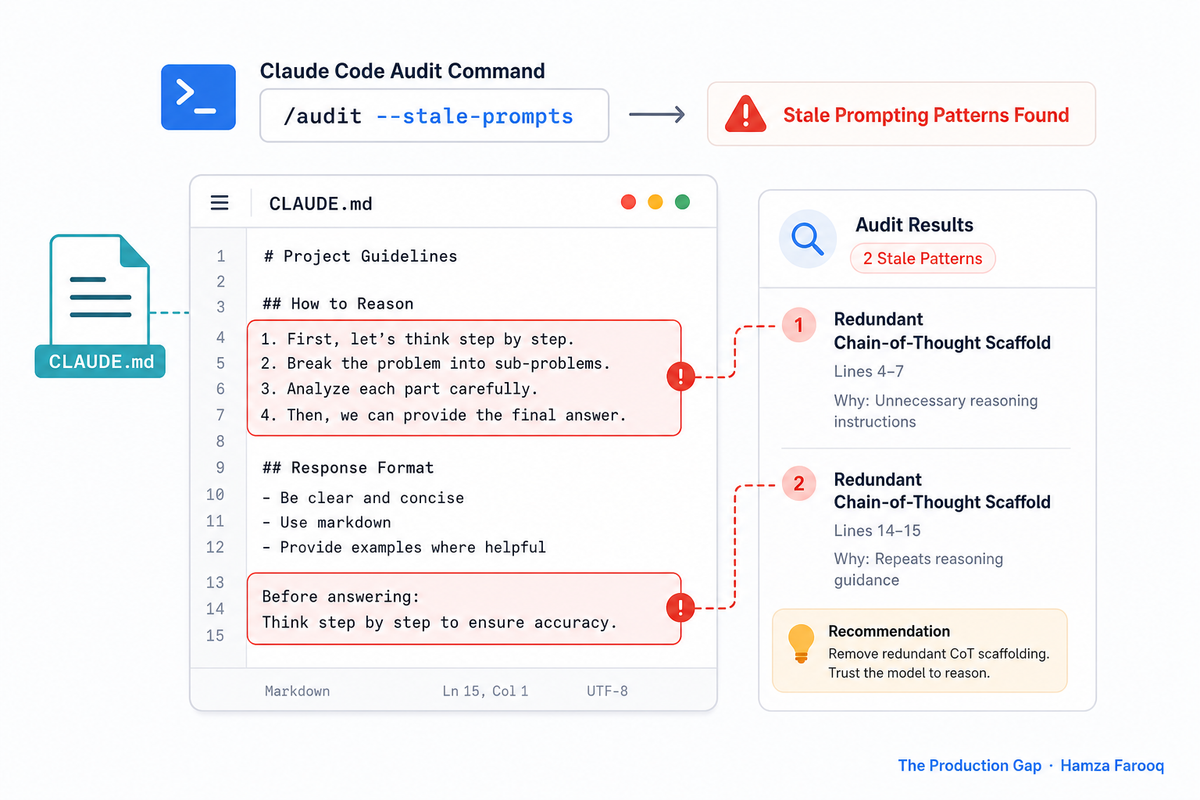
TL;DR: A Claude Code audit command scans your CLAUDE.md, custom commands, and agent prompts for outdated prompting patterns, including deprecated syntax, contradictory rules, and instructions written for older model behaviors. Running one surfaces specific categories of drift so your team can systematically update, consolidate, or remove stale guidance before it quietly degrades Claude's output quality.
Key Takeaways
- CLAUDE.md files accumulate prompt debt: Instructions written for older models pile up and may work against current Claude behavior.
- Audit commands treat prompts as engineering artifacts: A Claude Code audit command scans configuration files like a linter, flagging redundant, broken, or outdated patterns.
- Remediation requires prioritization, not a purge: Diff prompt behavior before and after each change rather than deleting everything at once.
- Community tooling extends native capabilities: MCP Market and community skill auditors give teams ready-made audit commands without building from scratch.
- Prompt audits belong in your sprint cycle: Configuration hygiene as a recurring practice prevents prompt debt from compounding between model updates.
Introduction
Teams that built their CLAUDE.md files for older Claude versions may be running a more capable model inside unnecessarily constrictive instructions. The prompt debt this creates does not always look like a bug: output still comes out and tasks still complete. Community practitioners have been actively documenting this problem, working through audit approaches for entire codebases including security checking and framework-specific best practices. This article shows you how to surface stale patterns and fix them systematically.
What exactly is a Claude Code audit command, and how does it differ from a security audit?
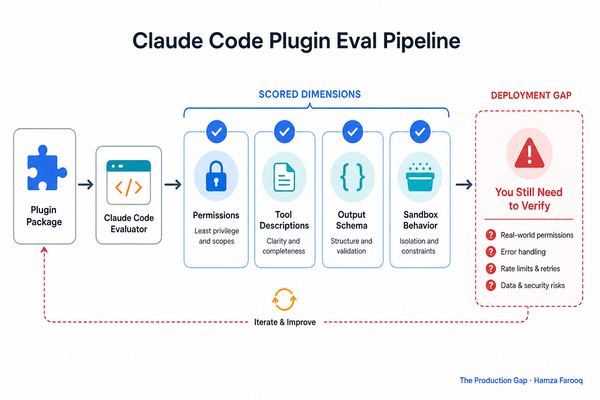
A Claude Code audit command scans your CLAUDE.md, custom commands, and agent prompts as auditable engineering artifacts, flagging patterns that are redundant, broken, or potentially counterproductive with current model versions. That distinction matters because security audits and prompt-hygiene audits point at completely different targets.
Security audit skills, like the Security Audit skill on MCP Market, point at your code. A prompt-hygiene audit points at your configuration surface: CLAUDE.md, .claude/commands/, skill definitions, and subagent prompts. One finds vulnerabilities in what you ship; the other finds issues in how you are instructing the model. Per Thoughtbot's documented behavior, write your prompt-hygiene skill once, store it in .claude/commands/prompt-audit.md, and invoke it like any other slash command, with no special infrastructure required.
What three categories of stale patterns does a prompt audit actually flag?
The three categories a Claude Code prompt audit flags are redundant scaffolding, outdated tool-call syntax, and over-specified formatting instructions. Each category represents a class of instructions that were written as practical workarounds for earlier model limitations and may no longer serve their original purpose.
Table 1: Five Stale Prompting Pattern Categories and Their Current Effects
| Pattern category | Original reason | Potential current effect |
|---|---|---|
| Chain-of-thought scaffolding | Older models benefited from explicit reasoning prompts | Author inference: may constrain or duplicate native behavior |
| XML tool-call formatting | Early API integrations required manual structure | Author inference: can create inconsistent tool-call behavior |
| Granular markdown directives | Model formatting was less reliable | May override context-appropriate judgment |
| Context-repetition instructions | Models lost context mid-task | Adds tokens and verbosity |
| Manual step enumeration | Agent sequencing required explicit scaffolding | May interrupt multi-agent task planning |
How do you actually implement or install a prompt audit command today?
You can implement a Claude Code prompt audit command by writing a skill definition in .claude/commands/prompt-audit.md, or by installing a pre-built auditor from MCP Market or the community.
Option A: Write your own skill file
Mirror the community /code-audit skill format: name your target artifacts, define evaluation criteria against the three stale-pattern categories, and produce a severity-ranked report. Build the skill to report, not auto-modify. Flag first, then modify after reviewing results.
Option B: Install a pre-built auditor
The MCP Market Audit Skills tool performs automated compliance checks, maintainability scoring, and false positive validation, and is available as a direct install. The Cs Code Auditor is installable via CLI or manual setup and extends coverage to subagent definitions.
Option C: Use community prompt templates
The r/ClaudeAI thread on functional codebase audits documents practitioners building audit commands from worked examples as few-shot context. Giving Claude two or three examples of stale patterns and asking it to find more is a reasonable starting point for teams that prefer to build before they buy.
What does a realistic remediation workflow look like after running your first audit?
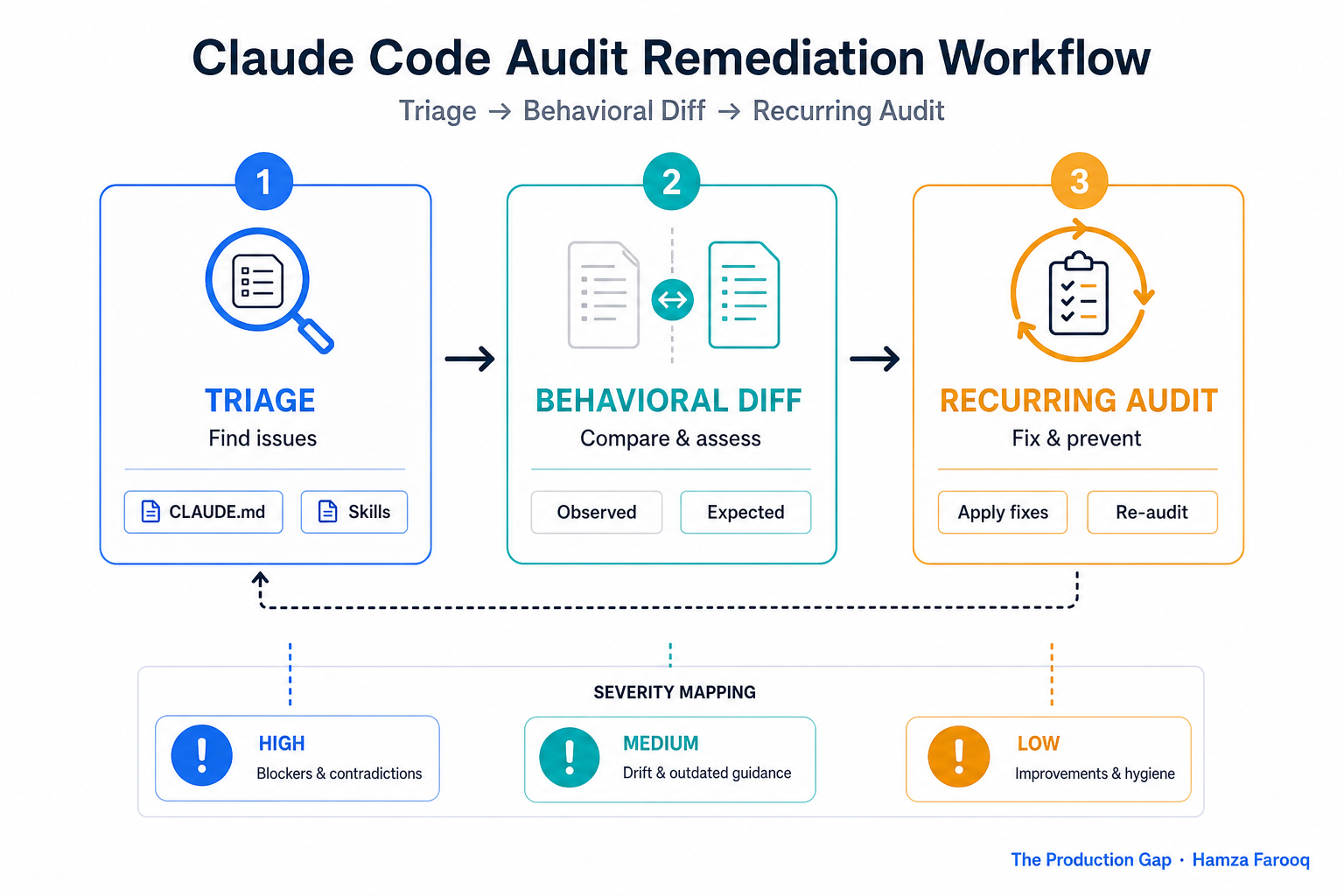
Phase 1: Triage, do not purge
Starting with the highest-priority flags, such as chain-of-thought scaffolding and manual step enumeration, is a practical rule of thumb before touching medium-priority items. Deleting everything at once can break working slash commands in ways that are difficult to trace back to a specific change.
Phase 2: Behavioral diffing
For each flagged pattern removed, run a defined set of representative tasks against both the pre- and post-removal CLAUDE.md and capture outputs side by side. The MCP Market Audit Skills tool includes false positive validation that partially automates this for skill-level changes. Full CLAUDE.md behavioral diffing still requires a manual task suite.
Phase 3: Make it recurring
Tying a prompt audit to your sprint cycle, or at minimum to any Claude version upgrade, is a straightforward way to prevent debt from compounding. The Audit Skills tool's maintainability scoring can make cadence reviews faster by giving you a score delta to track rather than re-reading every configuration file manually.
FAQ
Q2: How do I write an audit command that checks my CLAUDE.md without breaking anything? Write a skill file in .claude/commands/prompt-audit.md that names your target files and defines evaluation criteria as a checklist of known stale pattern categories. Structure it to produce a ranked report, not a deletion list. Flag first, modify second, and only after establishing behavioral baselines for the tasks your team runs most often.
Q3: Can a Claude Code audit command diff prompt behavior before and after removing flagged patterns? Not natively in a single command. The MCP Market Audit Skills tool includes false positive validation that partially automates comparison for skill-level changes, though full CLAUDE.md behavioral diffing still requires a manual task suite covering your representative use cases.
Q4: How often should a team run a prompt audit? Running one with each Claude version upgrade and periodically through the sprint cycle is a reasonable approach. The MCP Market Audit Skills tool's maintainability scoring makes cadence reviews faster: tracking a score delta is more efficient than re-reading configuration files from scratch each time.
Conclusion
Your CLAUDE.md runs, your commands execute, your agents complete tasks. But if those files were written for an older Claude, they may be constraining the model with instructions built for different behavior. A Claude Code audit command treats your prompt files the same way a linter treats code: as engineering artifacts that accumulate technical debt and warrant regular review. The tooling already exists. MCP Market, the Cs Code Auditor, and community skill templates mean you do not need to build audit infrastructure from scratch.
A practical first step: open your CLAUDE.md and scan for instructions that tell the model how to structure its reasoning process. Those are the patterns most worth reviewing against current model behavior.
Learn from me

Claude Code in Practice, my Maven cohort. Master Claude Code from fundamentals to advanced orchestration: skills, subagents, hooks, MCP, and production automation. Join the next cohort →
Hire us
Traversaal.ai. We're a team of forward deployed engineers solving the toughest AI problems for Fortune 100 companies: document intelligence, agentic data platforms, and real-time web intelligence, deployed in production. Work with our team to deploy your next agentic ecosystem. Talk to Traversaal.ai →
Join us
Want to solve these problems with us? We're always looking for forward deployed engineers who want to ship production AI. jobs@traversaal.ai