Claude Code Hooks: Add Hard Guardrails to Your AI Agent Workflow
Claude Code hooks enforce hard guardrails your AI agent can't argue around. Learn exit codes, lifecycle events, and shell handlers that keep agentic workflows safe.

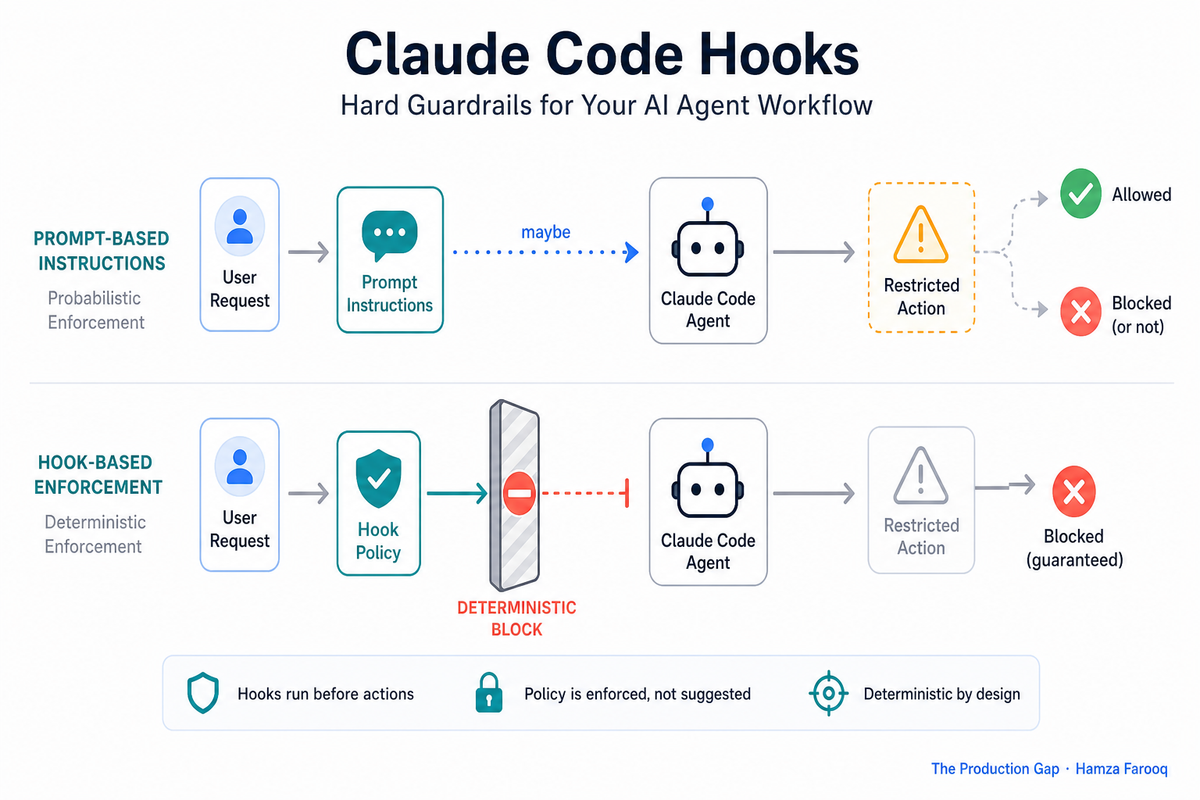
TL;DR: Claude Code hooks are shell scripts that run automatically at fixed points in the agent loop, giving you deterministic control over what Claude can and cannot do regardless of how it reasons. Unlike prompt instructions, hooks enforce hard rules through exit codes (blocking dangerous commands, requiring tests to pass before commits, or auto-formatting files) with zero chance of the model talking its way around them.
Key Takeaways
- Hooks enforce rules at the OS level and cannot be argued around by the agent, prompt instructions can.
- PreToolUse intercepts a tool call before execution, which is the only place to stop harm before it happens.
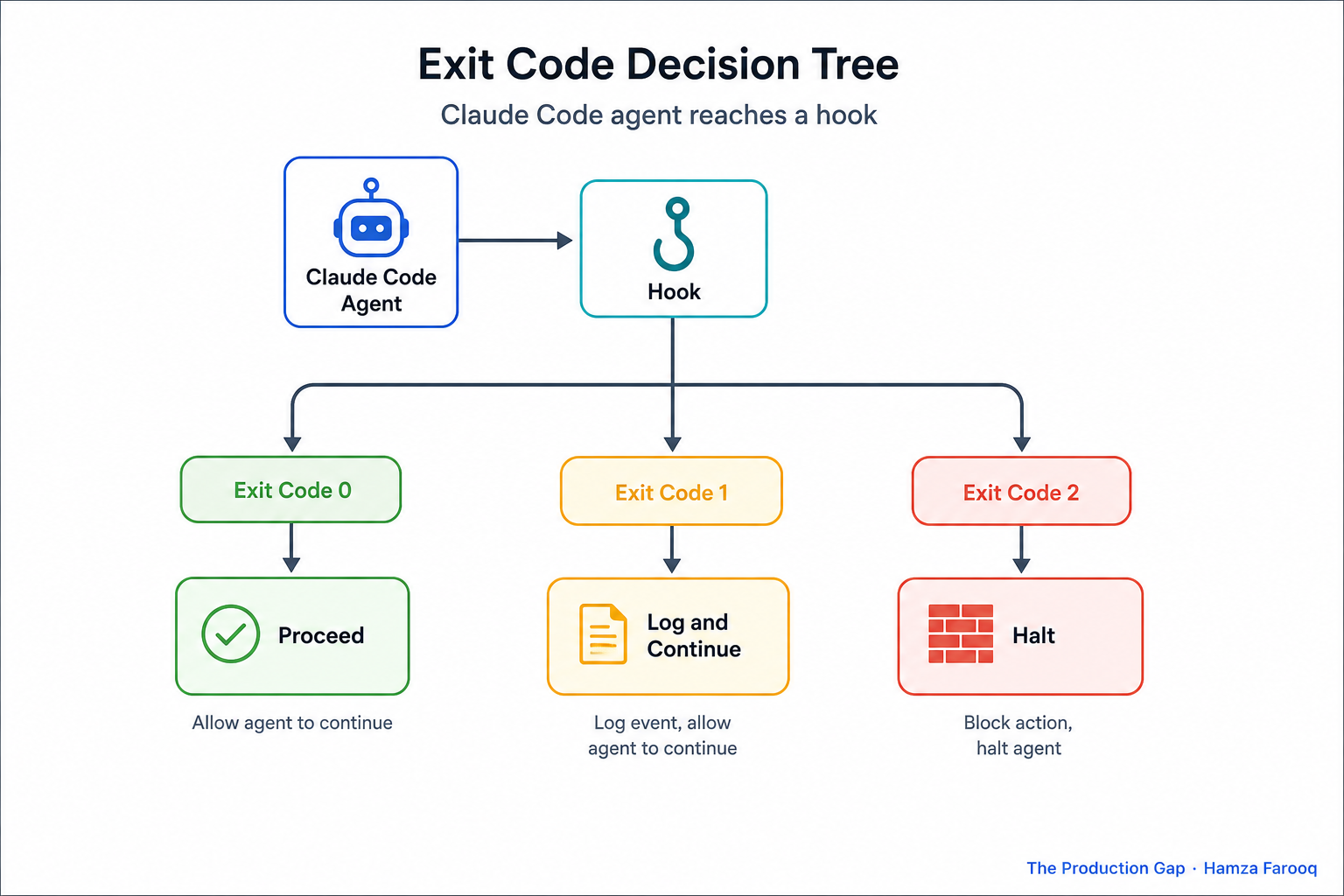
- Exit codes control what happens next: 0 proceeds, 1 warns and continues, 2 halts immediately.
- Three handler types cover the main cases: shell for simple rules, HTTP for external policy, LLM for judgment calls.
- PostToolUse lets you auto-run tests before commits land or reformat files the moment Claude finishes editing.
- Deterministic guardrails are now a security review requirement, not a convenience.
Claude Code increasingly runs autonomously inside CI/CD pipelines, multi-agent stacks, and shared engineering environments. Prompt instructions are probabilistic, Claude can misinterpret them, or get reasoned around them across a long agentic session. That's manageable with a developer watching. It isn't when the agent has write access to a shared codebase and no human in the loop.
What are Claude Code hooks and how does the lifecycle work?
Claude Code hooks are shell commands, HTTP endpoints, or LLM prompts that execute automatically at fixed points in the agent's tool-call lifecycle, giving you deterministic control that prompt instructions cannot provide.
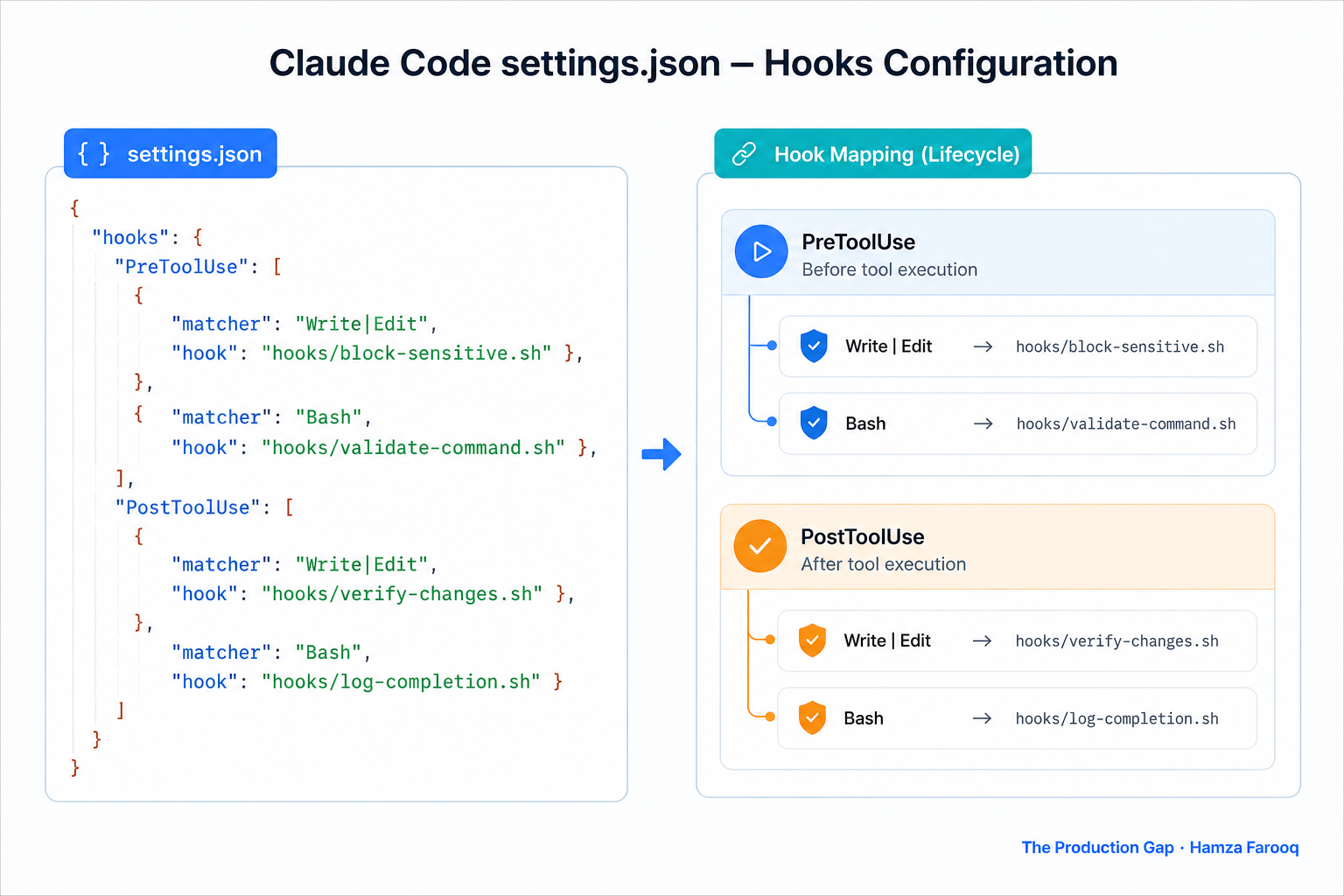
PreToolUse fires before execution, the only place to stop damage before it happens. PostToolUse fires after execution, making it the right place for quality enforcement like running tests or auto-formatting. Stop fires when the agent wants to terminate, useful for cleanup or audit logging.
Hooks live in .claude/settings.json at your project root for project-scoped rules, or in a global user config for machine-wide defaults:
{
  "hooks": {
    "PreToolUse": [
      { "type": "shell", "command": "echo 'intercepted'" }
    ]
  }
}
A hook runs at the OS level as a separate process. Claude never sees it and cannot override it, the same primitive as Git's pre-commit hook, now applied to AI agents.
How do exit codes control agent behavior?
A Claude Code hook controls the agent's next action entirely through its exit code: 0 proceeds, 1 logs a warning and continues, 2 halts immediately, making your hook's return value the actual enforcement mechanism.
| Exit Code | Behavior | When to Use |
|---|---|---|
0 |
Proceeds normally | Validation passed |
1 |
Warning logged, agent continues | Soft violation; record but don't block |
2 |
Agent halts immediately | Hard violation; stop before damage occurs |
These codes are interpreted by the Claude Code runtime, not by the model, which cannot override them. Use code 2 for anything irreversible: destructive filesystem operations, pushing to a protected branch, calling a production API without confirmation. Use code 1 for audit logging, a fintech team might fire it on every write to /payments/ to append events to a compliance log for SOC 2 review. Prompt-level logging can't make that guarantee because it lives inside the conversation and is mutable.
What are the three handler types and when do you use each?
Claude Code hooks support three handler types: shell for simple local rules, HTTP for external policy systems, and LLM prompts for judgment calls. Which one you pick determines whether your guardrail is fast, scalable, or context-aware.
Shell command handlers run a local script synchronously and return an exit code. No dependencies, no network hop. They handle straightforward cases well: blocking command patterns, running formatters, invoking test suites.
HTTP endpoint handlers POST the full tool call payload to your endpoint, and the HTTP response code maps to proceed, warn, or halt. Use these when enforcement logic lives outside the repo, a centralized security policy API or secrets-scanning service shared across your org.
LLM prompt handlers forward tool call context to a separate model call and use the response to decide. Use them when the rule can't be expressed as static policy, for example, "does this edit touch auth logic without adding a test?" A shell script can't answer that. A model with code context can.
Simple deterministic rule: use shell. External shared policy: use HTTP. Contextual judgment: use LLM prompt.
Four production-ready hook examples you can copy now
The fastest way to harden a Claude Code deployment is to drop these four hooks into .claude/settings.json. Each one covers a distinct failure mode that prompt instructions will reliably miss.
Example 1, Block rm -rf before execution (PreToolUse, exit 2):
#!/bin/bash
if echo "$CLAUDE_TOOL_INPUT" | grep -qE 'rm\s+-rf|rm\s+--force'; then
  echo "BLOCKED: Destructive rm command intercepted." >&2
  exit 2
fi
exit 0
Example 2, Enforce tests before git commit (PostToolUse, exit 2):
#!/bin/bash
if echo "$CLAUDE_TOOL_INPUT" | grep -q 'git commit'; then
  npm test || exit 2
fi
exit 0
Example 3, Auto-format files after edits (PostToolUse, exit 0):
#!/bin/bash
FILE=$(echo "$CLAUDE_TOOL_INPUT" | jq -r '.path')
prettier --write "$FILE" 2>/dev/null
exit 0
Example 4, Audit log every tool call to external endpoint (PostToolUse, HTTP):
{
  "hooks": {
    "PostToolUse": [
      {
        "type": "http",
        "url": "https://audit.internal/claude-events",
        "on_error": "warn"
      }
    ]
  }
}
Frequently Asked Questions
How do Claude Code hooks differ from prompt instructions? Prompt instructions are interpreted probabilistically, Claude can misapply them across a long session. Hooks are OS-level process boundaries that execute regardless of model state. Claude cannot access hook logic or override exit codes.
Where are hook configurations stored and how are they scoped? In .claude/settings.json at your project root for repo-level scope; a global user config applies machine-wide defaults. Most teams keep security hooks global and quality hooks in the repo file.
Can hooks call external HTTP endpoints, or only shell scripts? Hooks support three handler types: shell, HTTP, and LLM prompt. HTTP handlers POST the full tool call payload to your endpoint and the response status maps to proceed, warn, or halt.
What exit code prevents a command without stopping the entire session? Exit code 1 logs a warning and lets the agent continue, use it for soft violations you want to record. Reserve exit code 2 for irreversible actions.
The contract that makes Claude Code safe to deploy
Prompt instructions are a conversation. Hooks are a contract. Security reviews increasingly ask whether AI agent deployments have enforceable boundaries, a system prompt doesn't satisfy that question; a hook with exit code 2 does.
Start with the destructive command block from Section 4. It requires no external dependencies, drops into .claude/settings.json in minutes, and closes the most common gap auditors flag in agentic deployments.
Learn from me
Claude Code in Practice, my Maven cohort. Master Claude Code from fundamentals to advanced orchestration: skills, subagents, hooks, MCP, and production automation. Join the next cohort →
Hire us
Traversaal.ai. We're a team of forward deployed engineers solving the toughest AI problems for Fortune 100 companies: document intelligence, agentic data platforms, and real-time web intelligence, deployed in production. Work with our team to deploy your next agentic ecosystem. Talk to Traversaal.ai →
Join us
Want to solve these problems with us? We're always looking for forward deployed engineers who want to ship production AI. jobs@traversaal.ai