Codex custom model provider gateway: what do releases 0.168.0 and 0.169.0 add?
What the Codex 0.168.0 and 0.169.0 release notes and docs say about custom model providers, device-code sign-in over SSH and editing providers in the terminal.

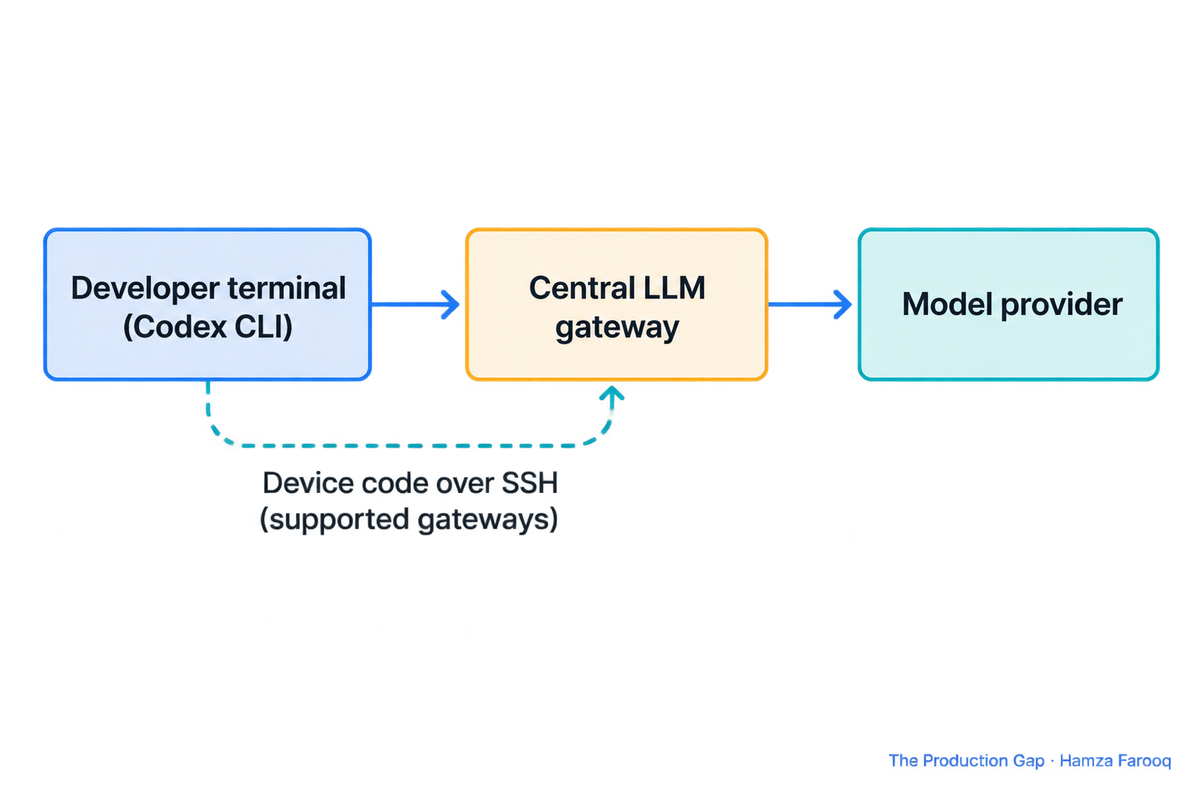
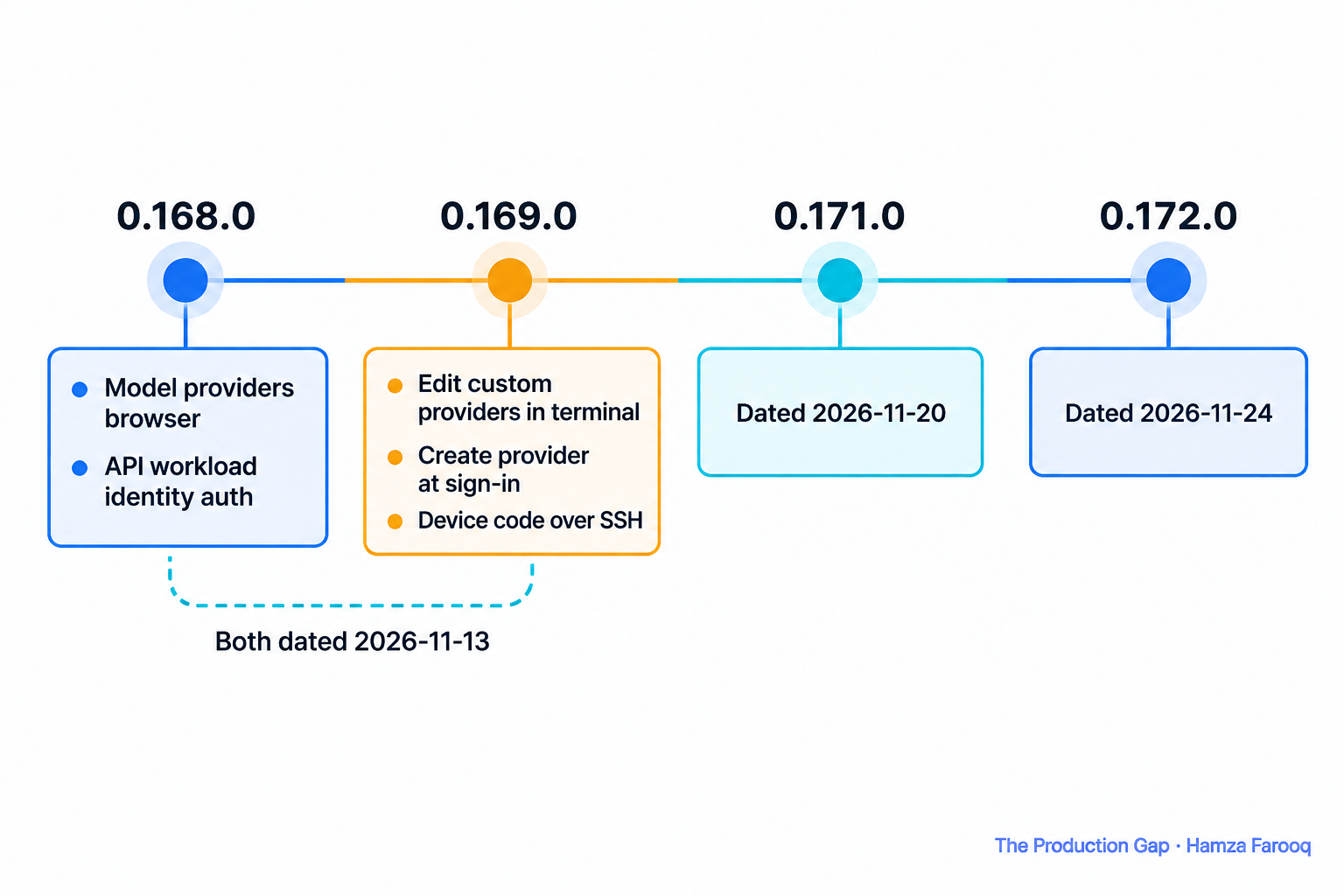
Codex CLI 0.168.0 added a Model providers browser, and 0.169.0 let users add or edit custom model providers from the terminal, create a provider during sign-in and use a device code over SSH for supported gateways. The Codex changelog dates both releases 2026-11-13. For a platform team that routes coding agents through a central proxy, provider setup now has a terminal path.
TL;DR: Codex 0.168.0 and 0.169.0, both dated 2026-11-13 on the changelog, add a Model providers browser, terminal editing of custom providers, provider creation during sign-in and device-code sign-in for supported gateways over SSH. The docs show a config.toml table and a device_authorization_url key. I could not read the dedicated gateway setup page, so test against your own gateway.
Key Takeaways
- Provider browser: 0.168.0 lets you browse model providers under Sessions → Model providers and choose the default for new chats.
- Terminal editing: 0.169.0 adds or edits custom model providers from the terminal.
- Sign-in: with custom gateway onboarding enabled, you can create a provider during sign-in.
- Device code: supported gateways can use a device code over SSH or without a local browser.
- Newer releases: the changelog already lists 0.171.0 and 0.172.0, so read the latest notes before rollout.
What did Codex 0.168.0 and 0.169.0 change for custom model providers?
Release 0.168.0 added a place to see providers, and 0.169.0 added a way to change them without leaving the terminal. The 0.168.0 release notes say users can "Browse model providers under Sessions → Model providers and choose the default for new chats." They also list app-server items for provider discovery and for provider configuration writes.
The 0.169.0 release notes say users can "Add or edit custom model providers from the terminal." The changelog entry behind it reads "Add provider configuration editing to the TUI," and another reads "Allow creating custom providers during sign-in."
The 0.168.0 feature list does not use the phrase "custom providers." Its documentation item says the app-server reference covers creating custom gateways. Treating the two releases as one story is my reading, not a claim either page makes.
How does device-code sign-in work for a gateway over SSH?
Device-code sign-in lets a person authorize a gateway when the machine running Codex has no local browser. The 0.169.0 notes say that with custom gateway onboarding enabled, you can create a provider during sign-in and "use a device code for supported gateways over SSH or without a local browser."
The changelog entries behind that sentence name device-code authorization for gateway OAuth, device-code sign-in in headless TUI sessions and device authorization in app-server gateway OAuth. The same release lists an OpenSSH ProxyCommand mode for codex tcp-tunnel. The pages I read do not say the two are meant to be used together.
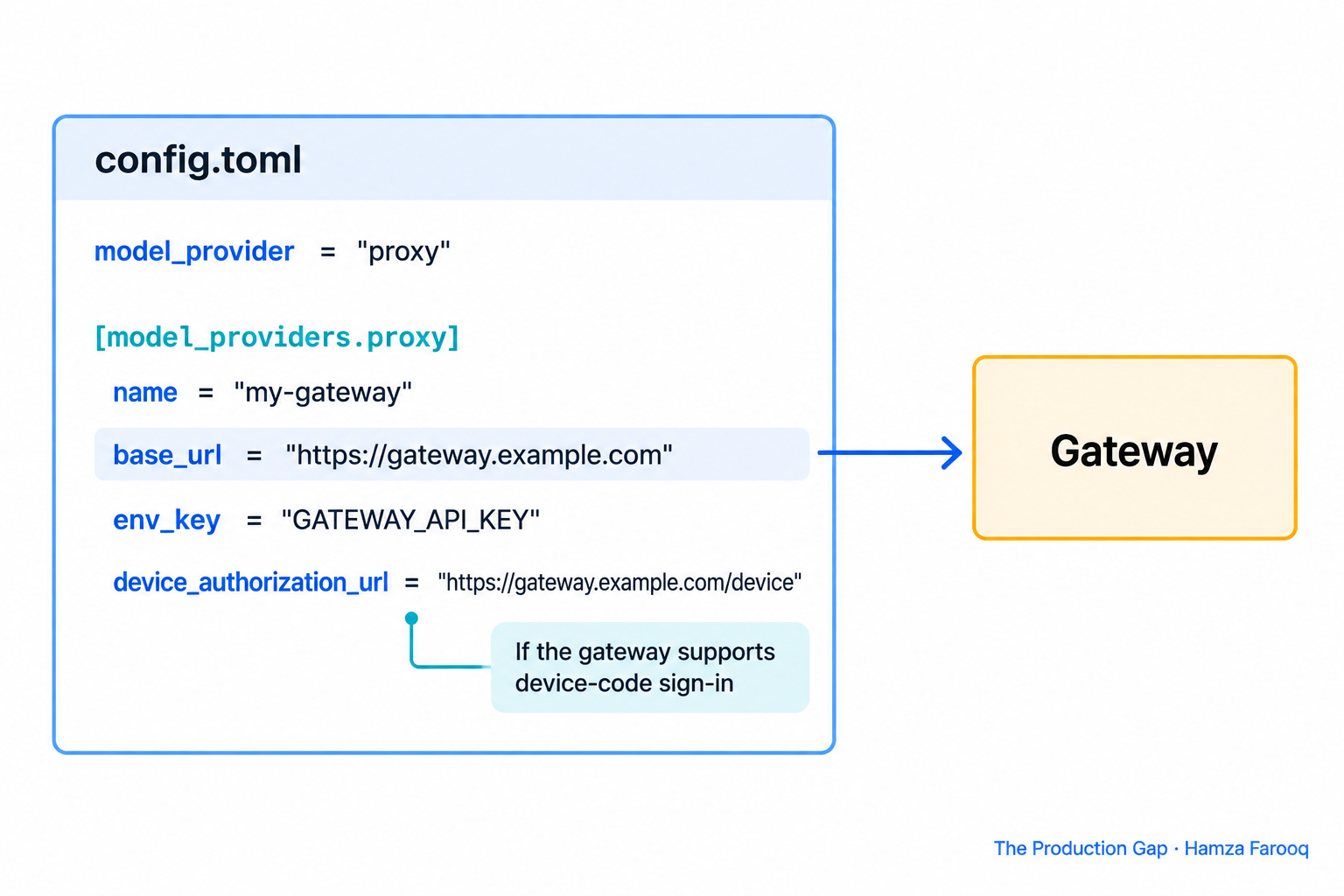
The configuration docs add the setting: if the gateway supports device-code sign-in, set device_authorization_url so CLI users can sign in over SSH.
What does a custom provider look like in config.toml?
A provider is a named table in config.toml that tells Codex how to connect to a model. The configuration docs describe it as covering base URL, wire API, authentication and optional HTTP headers.
The docs show model_provider = "proxy" to select a provider and a [model_providers.proxy] table with name, base_url and env_key. Other keys shown include http_headers, env_http_headers, query_params, request_max_retries, stream_max_retries and stream_idle_timeout_ms. The IDs openai, ollama, lmstudio, amazon-bedrock, amazon-bedrock-runtime and gcp are reserved, so a custom provider needs another name.
The same docs show two authentication routes. Native gateway OAuth uses a [model_providers.<id>.gateway_oauth] table. Command-backed authentication uses a [model_providers.<id>.auth] table with command, args, timeout_ms and refresh_interval_ms, and the docs say not to combine it with env_key. The page points to "Connect to a gateway" and "Roll out a gateway" pages for client setup and rollout. I did not read either page.
My suggestion: after the terminal editor writes a provider, compare the resulting config.toml with the key list above before you copy it to other machines.
Which release added each gateway feature?
| Feature and version | What the page says | Source |
|---|---|---|
| Model providers browser, 0.168.0 | Browse model providers under Sessions → Model providers and choose the default for new chats | 0.168.0 release notes |
| Terminal editing, 0.169.0 | Add or edit custom model providers from the terminal | 0.169.0 release notes |
| Provider creation at sign-in, 0.169.0 | With custom gateway onboarding enabled, create a provider during sign-in | 0.169.0 release notes |
| Device code over SSH, 0.169.0 | Use a device code for supported gateways over SSH or without a local browser | 0.169.0 release notes |
| API workload identity, 0.168.0 | Changelog entry: Support API workload identity authentication | Codex changelog |
| Device-code setting | Set device_authorization_url if the gateway supports device-code sign-in | Configuration docs |
The 0.169.0 changelog entry on workload identity reads "Bind API workload identity source reuse to session claims," while support for the authentication itself sits under 0.168.0 on the Codex changelog. The pages I read give no detail on how it works.
The changelog also dates 0.171.0 to 2026-11-20 and 0.172.0 to 2026-11-24. Readable 0.171.0 entries include "Add default model provider selection to the app server," SPIFFE JWT-SVID support for workload identity and an HTTP/2 fallback for SSH tunnels. The page text I received was cut off partway through the 0.171.0 list.
Frequently Asked Questions
Can Codex use a custom model provider from the terminal?
Yes, from 0.169.0. The release notes say users can add or edit custom model providers from the terminal. Release 0.168.0 added the Model providers browser under Sessions, where you can choose the default for new chats.
Does device-code sign-in work with every gateway?
No. The 0.169.0 notes say a device code works for supported gateways over SSH or without a local browser. The configuration docs say to set device_authorization_url if your gateway supports it.
Is the terminal editor the same as the Ctrl+S report editor?
No. The 0.169.0 notes also describe a terminal report editor where Ctrl+S saves a diagnostic ZIP locally, even when uploads are disabled. That is a separate diagnostics item from provider configuration editing in the TUI.
Where are the full gateway setup steps?
The configuration docs point to "Connect to a gateway" for client setup and verification and to "Roll out a gateway" for organization-wide rollout. I could not read either page, so I cannot say what they instruct.
Conclusion
If your team routes Codex through a central gateway, read the 0.169.0 notes first, then the newer releases. Confirm your gateway supports device authorization before you promise SSH users a smooth sign-in, and test the terminal editor on one machine before you standardize.
Hire us
Traversaal.ai. We're a team of forward deployed engineers solving the toughest AI problems for Fortune 100 companies: document intelligence, agentic data platforms, and real-time web intelligence, deployed in production. Work with our team to deploy your next agentic ecosystem. Talk to Traversaal.ai →
Join us
Want to solve these problems with us? We're always looking for forward deployed engineers who want to ship production AI. jobs@traversaal.ai