GitHub Copilot Auto Model Selection Explained: How Efficiency, Balance, and Intelligence Tiers Route Every Request
GitHub Copilot auto model selection routes each coding task across Efficiency, Balance, and Intelligence tiers. Learn how task signals drive smarter AI routing.

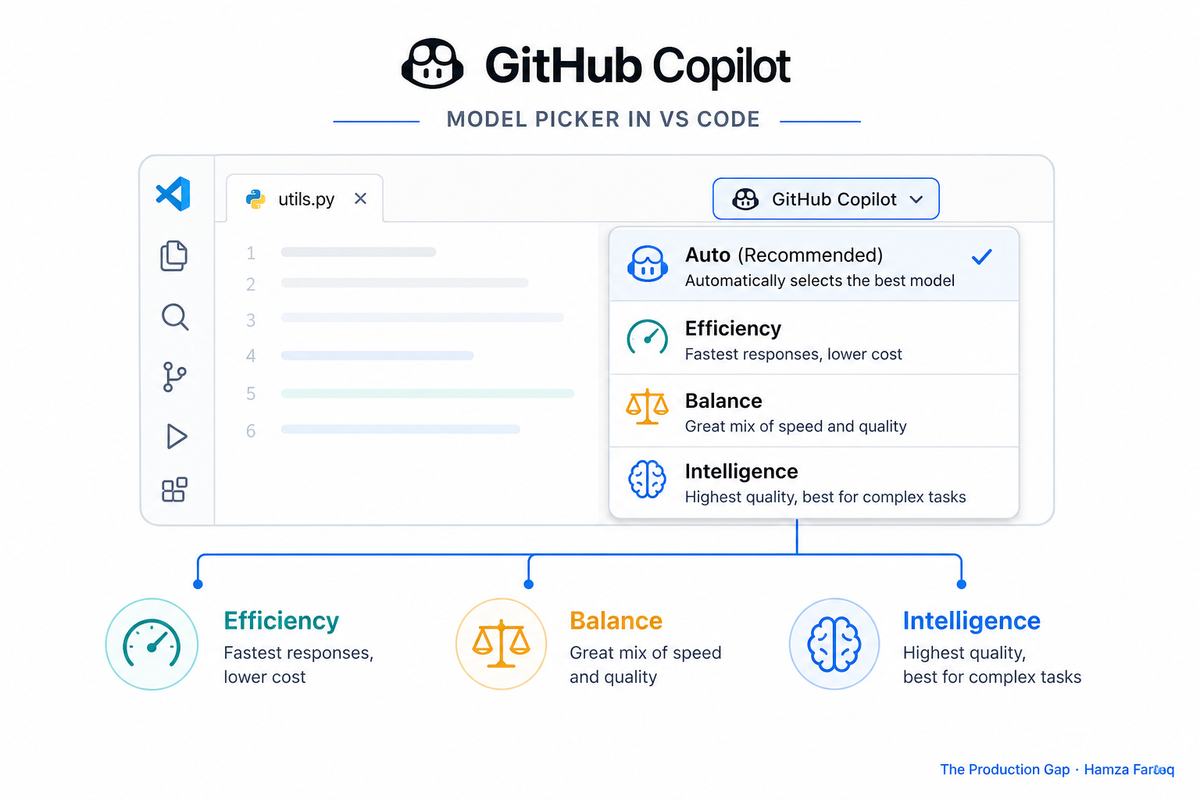
TL;DR: GitHub Copilot auto model selection is a per-request routing layer that automatically assigns each coding task to the most appropriate model tier based on task complexity, model health, and organizational policy. It routes across three tiers, Efficiency, Balance, and Intelligence, biasing toward cost or capability depending on what you are doing and what your admin allows. This tiered routing is becoming the standard by which AI coding tools are judged: not by raw model power, but by smart resource allocation.
Key Takeaways
- Auto mode picks models per request: Copilot evaluates each task individually rather than locking you into one model.
- Three tiers control the cost-power tradeoff: Efficiency, Balance, and Intelligence dial between fast-and-cheap and slow-and-capable.
- Routing reads task signals, not just load: since May 2026, Copilot factors in what you are actually doing before routing a request.
- Admins can wall off certain models entirely: enterprise policy limits which models are even eligible for auto selection.
- Copilot rarely tells you why it chose a model: routing runs silently, with no per-request explanation.
- Routing transparency is now a competitive battleground: how clearly a tool explains its model choices is becoming a real product differentiator.
Introduction
GitHub Copilot auto model selection is a per-request routing layer that automatically assigns each coding task to the most appropriate model tier based on task complexity, model health, and organizational policy. This article breaks down how that routing works, what signals drive it, who controls the guardrails, and why the opacity matters for teams evaluating AI coding tools.
How does GitHub Copilot auto model selection actually work?
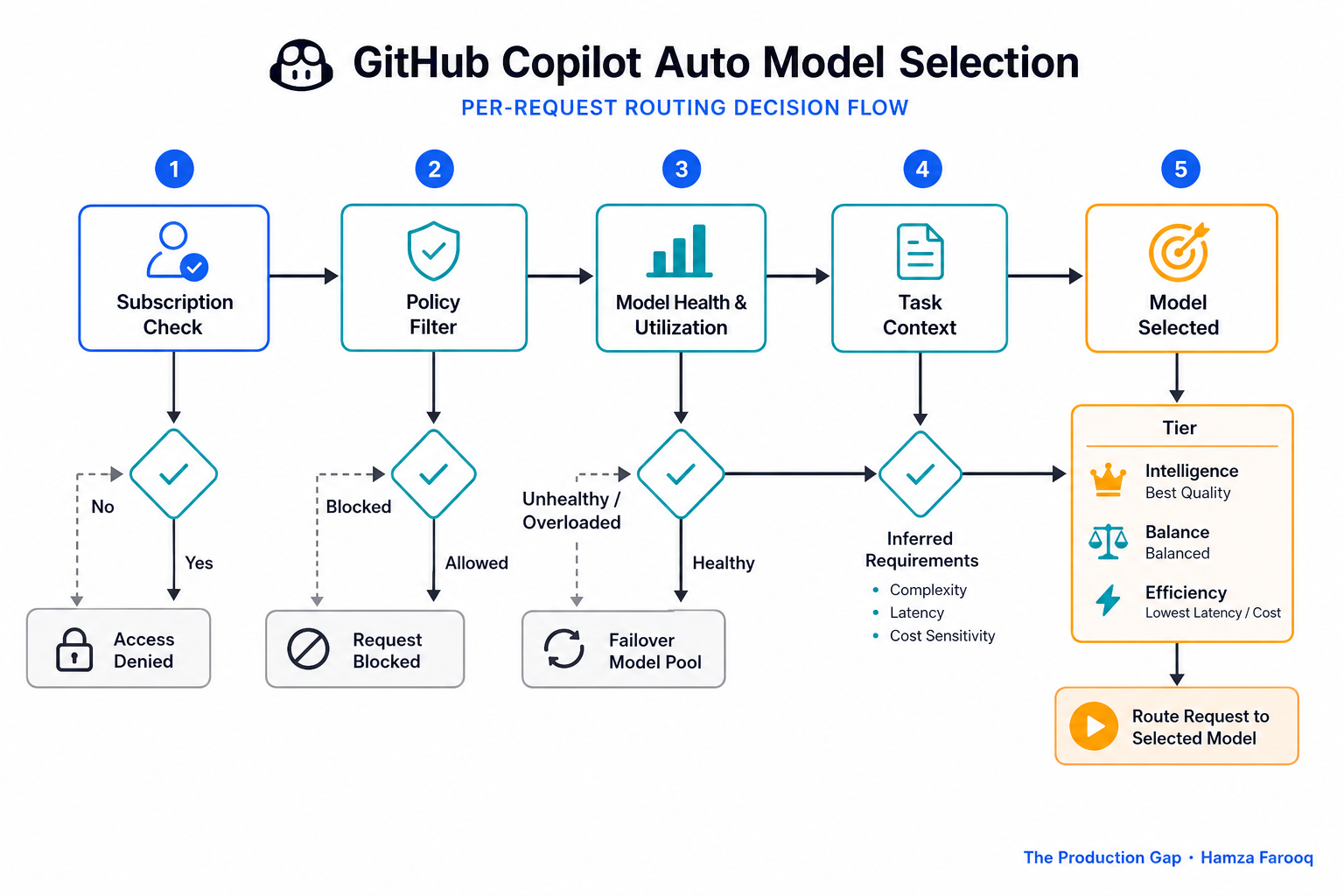
Every chat message or inline completion triggers a fresh routing decision. The system works through three things in order: which models are eligible given your subscription and admin policy; current model utilization and health; and, since the May 20, 2026 update, task context signals drawn from what you are actually doing. That third input is the meaningful change: routing now incorporates task signals rather than relying on utilization and health metrics alone.
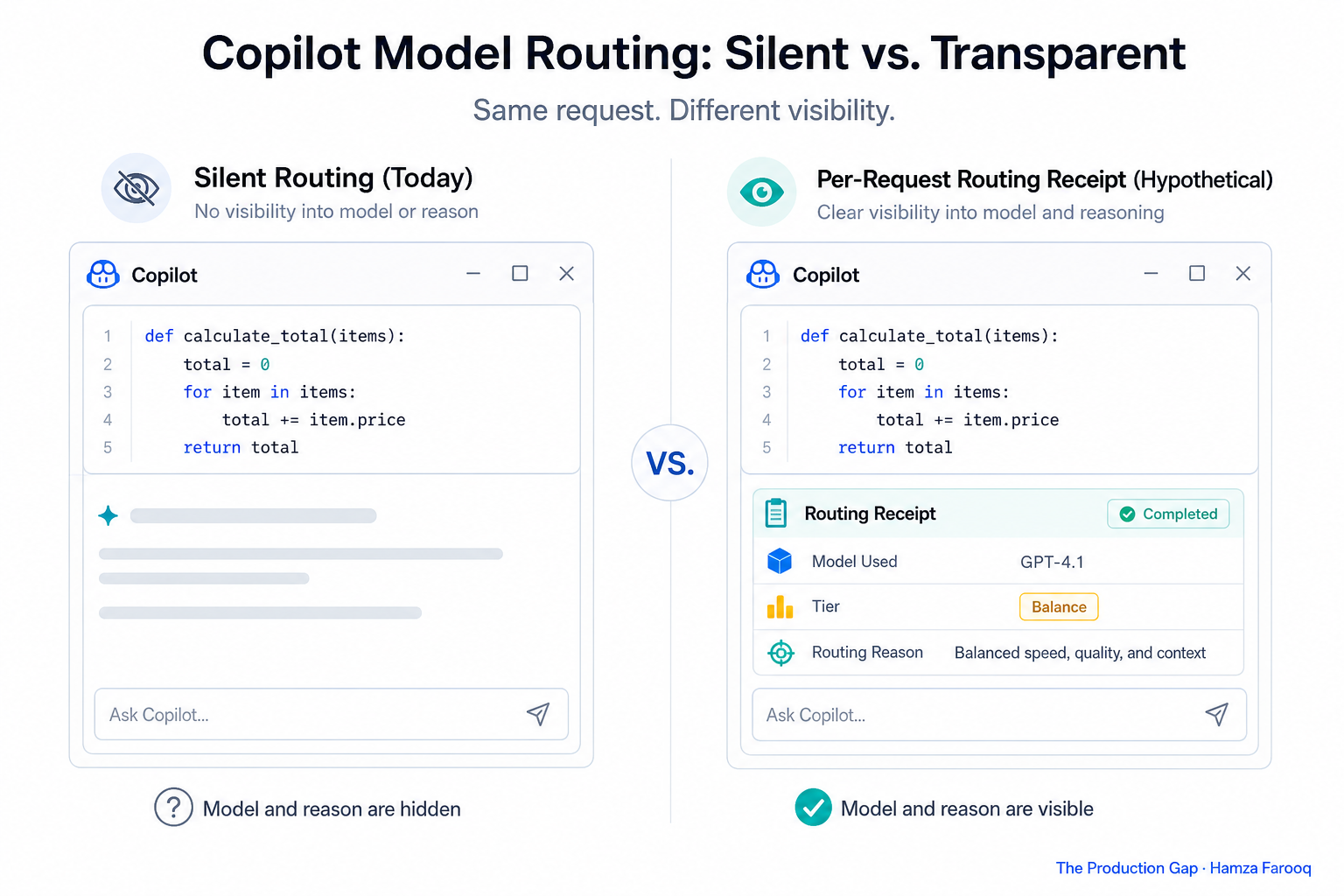
Auto mode is a per-request routing layer sitting above the model pool, not a single fixed model. It runs silently, and developers do not see which model handled their request or why that model was chosen.
What is the real difference between Efficiency, Balance, and Intelligence tiers?
Efficiency, Balance, and Intelligence are preference tiers that constrain which models auto selection can route to, biasing toward cost, capability, or a middle ground respectively.
Visual Studio Magazine's February 2026 analysis described these settings as dials between cost and quality rather than precision routing controls. Using that framing as a guide, each tier carries a distinct tradeoff worth understanding before committing to a default.
- Efficiency biases routing toward the cost-optimized end of the eligible model pool. The risk is that a demanding task may receive a lighter-weight response with no warning to the developer.
- Balance is the default. It attempts to match model weight to task complexity, and it is where most routing ambiguity sits in practice.
- Intelligence biases toward the more capable end of the eligible model pool, suited to complex or agentic work. As a practical rule of thumb, it can feel like overkill for simpler tasks and may consume more compute than the work requires.
The following table is author synthesis built from the tier descriptions above and the VS Magazine framing. It adds a "Routing signal used" row to show how behavior changed before and after May 2026, which is not restated elsewhere in the article.
| Attribute | Efficiency | Balance | Intelligence |
|---|---|---|---|
| Routing bias | Lightweight, cost-optimized | Mixed, task-sensitive | More capable models |
| Best for | Simpler, faster tasks | General daily coding work | Complex or agentic tasks |
| Primary tradeoff | May under-serve complex tasks silently | Hardest to predict; most routing ambiguity | Can overcost on simpler work |
| Routing signal used (before May 2026) | Utilization and model health only | Utilization and model health only | Utilization and model health only |
| Routing signal used (as of May 2026) | Utilization, health, and task context | Utilization, health, and task context | Utilization, health, and task context |
The concern with this setup is that tiers set a ceiling and floor on model weight without guaranteeing the right model for any specific task. They also shift accountability to the user: pick Efficiency and a complex task may be under-served; pick Intelligence and you may consume more compute than the work requires. Neither outcome is surfaced at the point of use.
Can enterprise admins control which models Copilot auto-selects from?
Yes, enterprise admins can restrict which models are eligible for auto selection, so routing only operates within organization-approved boundaries.
The official GitHub docs are explicit: auto selection chooses from supported models "subject to your policies and subscription type," and available models may change over time. A developer on Intelligence tier gets the most capable model their organization has approved, which may be materially different from what the tier label implies, and nothing at the point of use communicates that gap.
For regulated industries, this policy layer addresses genuine compliance requirements. Routing quality is silently bounded by decisions made before a developer touches the keyboard. The framework used in this guide recommends defining your eligible model pool before rolling out Auto mode to teams, so the tier labels reflect what developers will actually experience.
Why does Copilot not tell you which model it used, and why does that matter?
Copilot's routing runs silently, surfacing no model name and no rationale, leaving developers unable to audit individual decisions without abandoning Auto mode entirely.
For engineering leads evaluating AI coding tools, routing transparency is worth asking about directly. Whether a tool surfaces model choices is increasingly a practical differentiator for teams that need to audit outputs or manage compute costs.
FAQ
Q1: How does GitHub Copilot decide which model to use in Auto mode? Copilot evaluates each request against eligible models, current model health, and, since the May 2026 update, task context signals. The decision runs silently with no output visible to the developer.
Q2: What is the difference between Efficiency, Balance, and Intelligence tiers? Efficiency biases toward the cost-optimized end of the model pool; Intelligence toward the more capable end; Balance attempts to match model weight to task complexity and is the default. As Visual Studio Magazine's February 2026 analysis noted, none of these function as precision routing controls. They steer between cost and quality rather than guaranteeing a specific model for a specific task type.
Q3: Can GitHub Copilot enterprise admins restrict which models are eligible for auto selection? Yes, admins configure policies that limit the eligible model pool. Per the official GitHub docs, a developer's Intelligence tier setting only selects from models permitted under organizational policy and subscription type, which may be a smaller pool than the tier label implies.
Q4: Does Copilot Auto mode explain why it chose a particular model? No, Copilot surfaces neither the model name nor any routing rationale per request. Developers who want to audit model selection need to switch to manual model pinning via the model picker, announced in the VS Code auto model selection announcement post, or infer behavior from response patterns over time.
Conclusion
GitHub Copilot auto model selection is a preference-bounded routing layer that runs silently, ties accountability to tier labels, and gives teams almost no visibility into individual decisions. The May 2026 task-context update was real progress: routing now incorporates what you are doing, not just model availability. But knowing routing improved and knowing whether it made the right call on a specific task are different things.
For engineering leads, the framework used in this guide suggests three practical steps: use Auto mode as a reasonable default for mixed daily tasks; consider manual model pinning for high-stakes agentic workflows; and define your eligible model pool before rolling out to teams. When evaluating AI coding tools, routing transparency is worth asking about directly. Knowing which model handled a request, and why, is practical information for any team managing output quality and compute costs.
Learn from me

Claude Code in Practice, my Maven cohort. Master Claude Code from fundamentals to advanced orchestration: skills, subagents, hooks, MCP, and production automation. Join the next cohort →
Hire us
Traversaal.ai. We're a team of forward deployed engineers solving the toughest AI problems for Fortune 100 companies: document intelligence, agentic data platforms, and real-time web intelligence, deployed in production. Work with our team to deploy your next agentic ecosystem. Talk to Traversaal.ai →
Join us
Want to solve these problems with us? We're always looking for forward deployed engineers who want to ship production AI. jobs@traversaal.ai