Copilot Usage-Based Billing Is Now Default: How to Set Your 4,000-Credit Spending Cap Before Microsoft Does It for You
Copilot usage-based billing is now on by default. Set your Microsoft 365 credit spending cap before surprise overages hit your next invoice.

TL;DR: Copilot usage-based billing activates automatically for new Microsoft 365 Copilot Business purchases, and a vendor-set default monthly credit cap is applied to your tenant if you do not configure one yourself. To stay in control, open the Microsoft 365 admin center, navigate to Billing → Billing policies → Copilot spending policy, and set a finance-approved cap before your first billing cycle closes. CSP customers should confirm their licensing timeline directly with their reseller, as a reported end-of-sale deadline for the Copilot Business add-on SKU may affect purchasing options.
Key Takeaways
- A vendor-set default credit cap is not a finance-approved budget. Review and replace it with a deliberate, Finance-confirmed limit before your first billing cycle closes.
- API-driven integrations run continuously in the background and are likely to consume Copilot Credits faster than manual Copilot Chat, without surfacing alerts to end users.
- GitHub Copilot's rollout to usage-based billing is the clearest available precedent: at least one user faced a $180 bill on day one before a budget was configured.
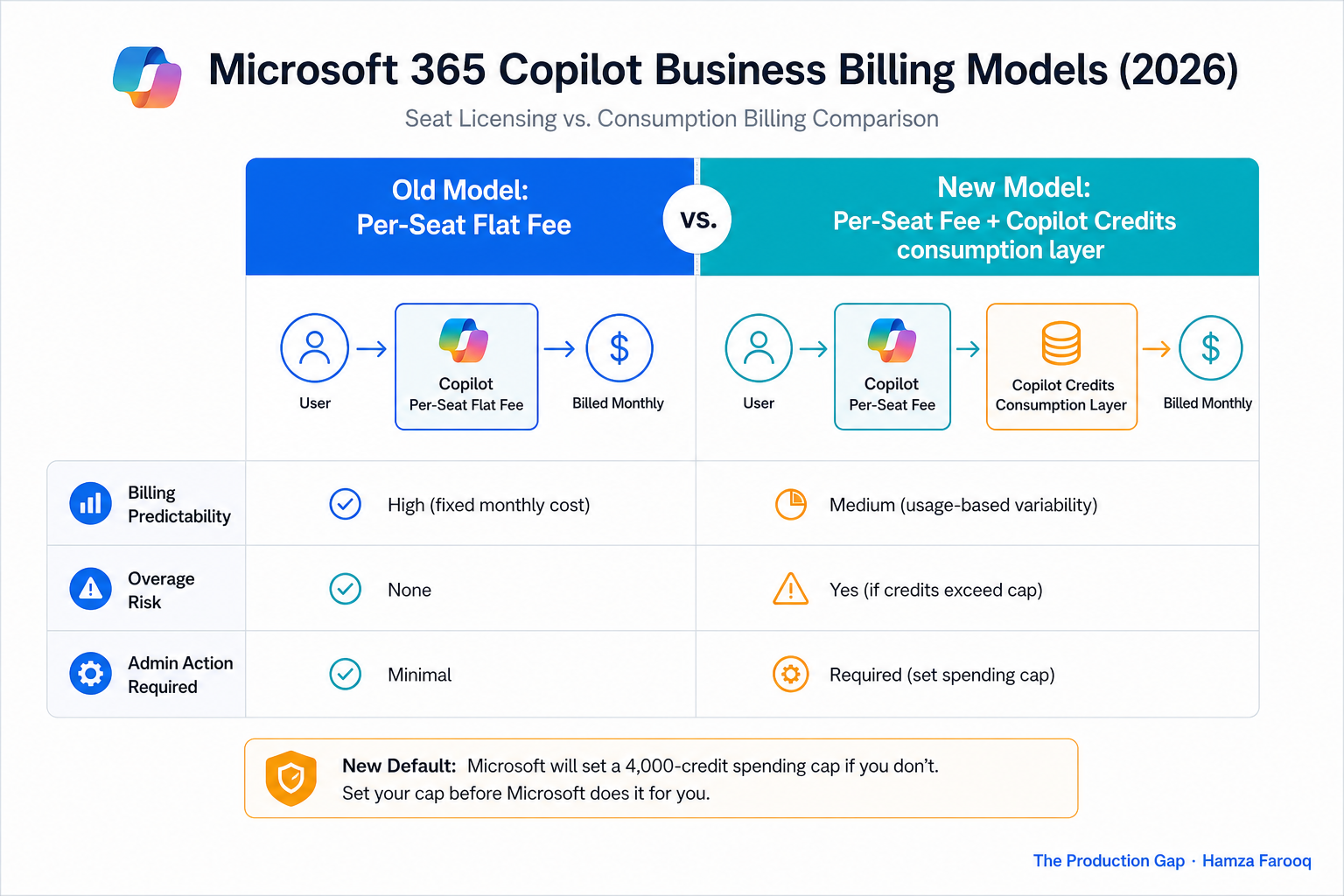
- Seat licensing and consumption billing now coexist. Your total Copilot spend is a variable expense, not a flat monthly line.
- CSP resellers and customers should confirm their purchasing and licensing timelines directly with Microsoft or their reseller rather than relying on third-party reporting for deadline accuracy.
What exactly is Copilot usage-based billing and how do credits work?
Microsoft 365 Copilot usage-based billing meters AI consumption in Copilot Credits, units tied to API calls, token input and output, and model complexity, charged on top of existing per-seat license fees.
GitHub Copilot operates under the same fundamental structure. As confirmed by GitHub's own documentation, each GitHub Copilot plan includes an allowance of GitHub AI Credits, with usage calculated based on token consumption including input, output, and cached tokens, using listed API rates for each model.
The practical implication for M365 admins is that credit consumption is not uniform across workloads. Some interactions are brief and bounded. Others, particularly automated and API-driven ones, run continuously and accumulate charges without user-initiated pauses.
Which workloads burn Copilot Credits fastest, and who is watching?
API-driven integrations run continuously in the background and are likely to consume Copilot Credits at higher rates than standard Copilot Chat, without surfacing any alert to the end user.
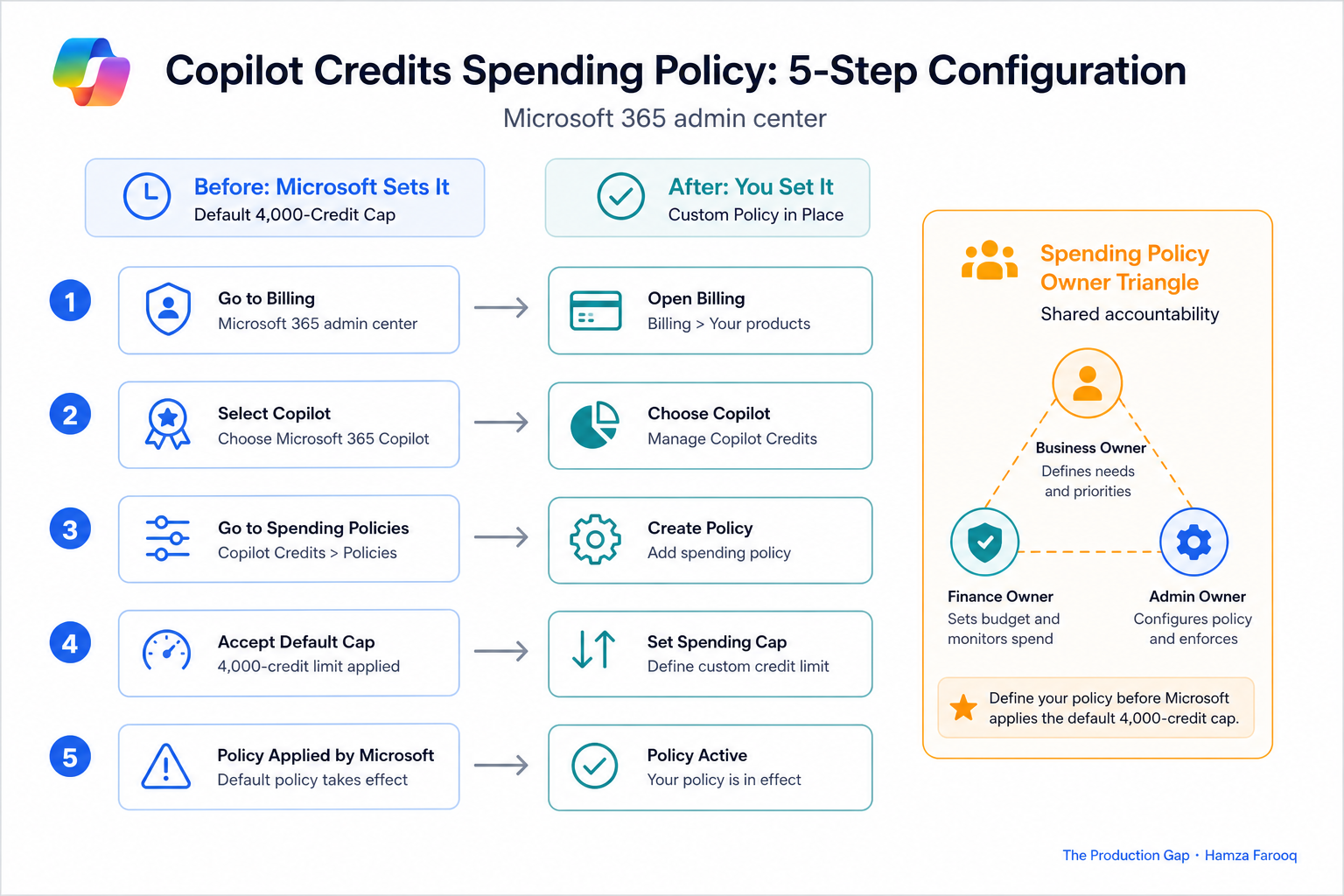
The practical danger is an accountability gap. Most tenants have three parties who could own the spending policy: the M365 admin, the finance team, and the Copilot pilot owner. In practice, none of them reliably do. The framework used in this guide assigns explicit ownership through what the author calls the Spending Policy Owner Triangle: three named people, three explicit confirmations before month-end.
- M365 Admin: inputs the cap and monitors the usage dashboard
- Finance Lead: approves the dollar ceiling that cap represents
- Copilot Pilot Owner: validates the cap against projected usage
The table below reflects author-estimated relative consumption tiers based on workload characteristics. These are not official Microsoft credit rates. Confirm exact per-action credit rates against Microsoft's published credit rate table before using any of these tiers for budget planning.
| Workload type | Relative credit consumption (author estimate) | Runs silently? | Admin visibility |
|---|---|---|---|
| Copilot Chat (manual) | Lower | No | Usage dashboard |
| Automated API integrations | Higher | Yes | Requires explicit monitoring setup |
| Copilot in Word or Excel | Lower | No | Usage dashboard |
| Copilot Studio custom agents | Medium | Partial | Agent-level logging |
How do you set your Copilot Credits spending cap right now?
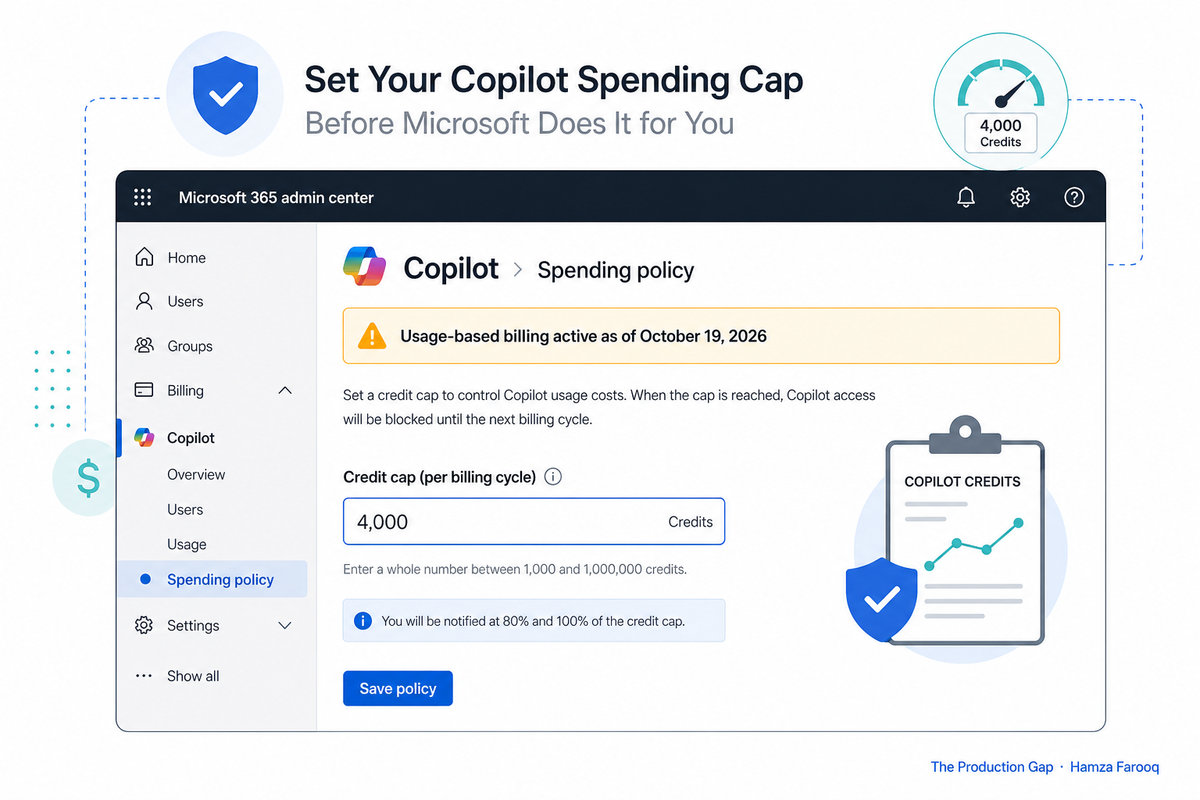
To configure your Copilot Credits spending cap, go to the Microsoft 365 admin center, navigate to Billing → Billing policies → Copilot spending policy, enter your per-user monthly credit limit, and save before your first billing cycle closes.
Work through the Spending Policy Owner Triangle before anyone enters a number in the admin center. The figure submitted must be Finance-approved and checked against actual usage projections, not inherited from the vendor default.
Configuration steps:
- Sign in to the Microsoft 365 admin center as a Global or Billing admin.
- Navigate to Billing → Billing policies.
- Select Copilot spending policy.
- Enter your approved per-user monthly credit limit.
- Save. The policy takes effect immediately across all licensed users.
If your tenant runs automated API pipelines, a practical rule of thumb from this guide is to start conservatively below the vendor default and monitor usage for at least two weeks before adjusting upward. If your billing cycle has already started, log in now rather than waiting for an invoice to prompt action.
What does the CSP channel change mean for your licensing position?
CSP resellers and customers may face a deadline to transact the Copilot Business add-on SKU through that channel before it goes end-of-sale, making the coming weeks a critical window to confirm your licensing position directly with your reseller.
The broader licensing math has changed regardless of channel. Total monthly Copilot cost now equals: (seats multiplied by per-seat fee) plus (credits consumed multiplied by per-credit rate). For CSP resellers, this creates a structural quoting challenge: the seat component is fixed, but credit overages are not. Customers running active Copilot pilots should factor both layers into any renewal or expansion conversation.
Frequently asked questions
How do I set or change the Copilot Credits spending cap in the Microsoft 365 admin center?
Navigate to Billing → Billing policies → Copilot spending policy, enter your per-user monthly credit limit, and save. Confirm the number with Finance before entering it. Do not rely on the vendor default without a deliberate review. The vendor-set default is a starting point, not a budget decision.
How do I find out whether my tenant blocks or bills for overage when the credit cap is reached?
Check your tenant's Copilot spending policy settings in the admin center under Billing → Billing policies → Copilot spending policy. The distinction between a hard service block and an overage charge determines whether your cap controls cost or controls usage, and it should drive how conservatively you set the limit. Verify the current behavior for your tenant configuration directly in those settings, since the outcome may differ by tenant type or policy configuration.
Which integrations consume the most Copilot Credits and how do I monitor them?
Automated API integrations are likely to consume credits faster than manual Copilot Chat because they run continuous background workloads without user-initiated pauses. Monitor consumption via Copilot usage reports in the admin center and confirm available alert threshold options within your tenant settings. Assign a named owner from the Spending Policy Owner Triangle to review the dashboard regularly, not just at billing cycle close.
How is M365 Copilot Business usage-based billing different from the GitHub Copilot AI Credits model?
Both meter AI consumption in credits tied to token usage, but GitHub Copilot covers developer tooling while M365 Copilot covers productivity workloads in Word, Excel, Teams, and connected APIs. GitHub's rollout is the most directly comparable precedent available. As confirmed by GitHub's documentation, usage is calculated based on token consumption including input, output, and cached tokens, using listed API rates for each model. Users who did not configure a budget before GitHub Copilot's usage-based rollout reported surprise charges, including a $180 bill on day one.
Conclusion
The risk is not the billing model itself. It is the gap between the moment usage-based billing becomes active on your tenant and the moment someone at your organization sets a finance-approved spending policy. The GitHub Copilot rollout demonstrated that gap can cost real money before most admins realize the meter is running.
Run the Spending Policy Owner Triangle this week: IT confirms the cap input, Finance approves the number, and the Copilot pilot owner checks it against projected usage. If you have automated API pipelines active, treat that review as urgent rather than routine.
The vendor-set default is a starting point, not a budget decision.
Open the Microsoft 365 admin center now, navigate to Billing → Billing policies → Copilot spending policy, and set a cap your finance team has reviewed before your billing cycle closes. For CSP customers, contact your reseller directly to confirm your licensing timeline rather than relying on unverified third-party deadline reporting.
Learn from me

Agentic AI for Product Managers, my Maven cohort. Learn how to design, evaluate, and ship reliable AI systems: the technical fluency PMs need to lead agentic products, no engineering background required. Join the next cohort →
Hire us
Traversaal.ai. We're a team of forward deployed engineers solving the toughest AI problems for Fortune 100 companies: document intelligence, agentic data platforms, and real-time web intelligence, deployed in production. Work with our team to deploy your next agentic ecosystem. Talk to Traversaal.ai →
Join us
Want to solve these problems with us? We're always looking for forward deployed engineers who want to ship production AI. jobs@traversaal.ai