Workday MCP Agent Integration Playbook: Headless HR and Finance Access, Inherited Permissions, and What Architects Must Govern Before Agents Act
Workday MCP agent integration explained: govern inherited permissions, audit trails, and approval gates before AI agents touch payroll or financial records.

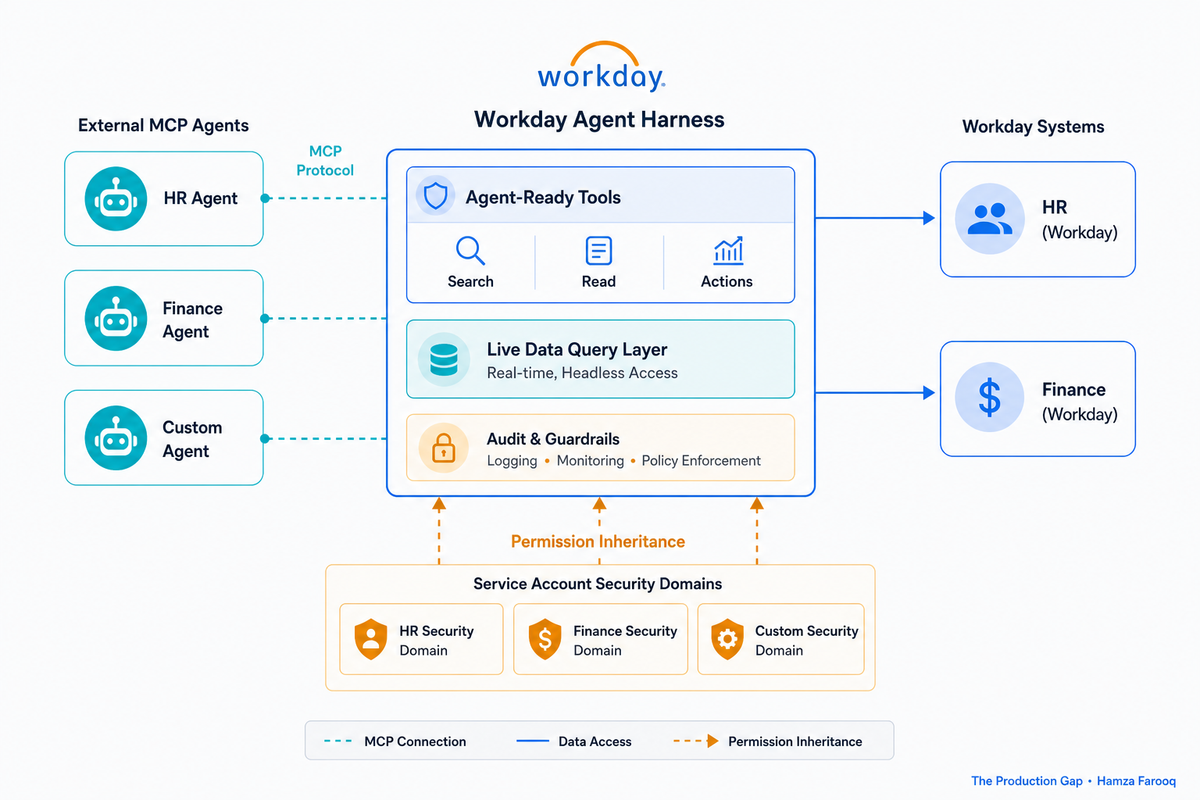
TL;DR: Workday MCP agent integration works by letting AI agents call Workday's native MCP Agent-Ready Tools using the authenticated user's inherited permissions, agents can only do what that user could already do in the UI. Architects must still define scope boundaries, audit trails, and approval gates before any agent acts on payroll, benefits, or financial records, because inherited permissions alone don't prevent agents from taking unintended actions at machine speed.
Key Takeaways
- Agent-Ready Tools are live: External AI agents can read and write HR and finance systems through governed MCP endpoints without a human in the loop.
- Agents inherit your existing Workday permissions: Security domains, roles, and approval chains on the service account govern every agent action.
- Native tools and complex reporting paths serve different jobs: Agent-Ready Tools handle standard transactions with built-in guardrails; reporting paths address analytics no pre-built tool covers.
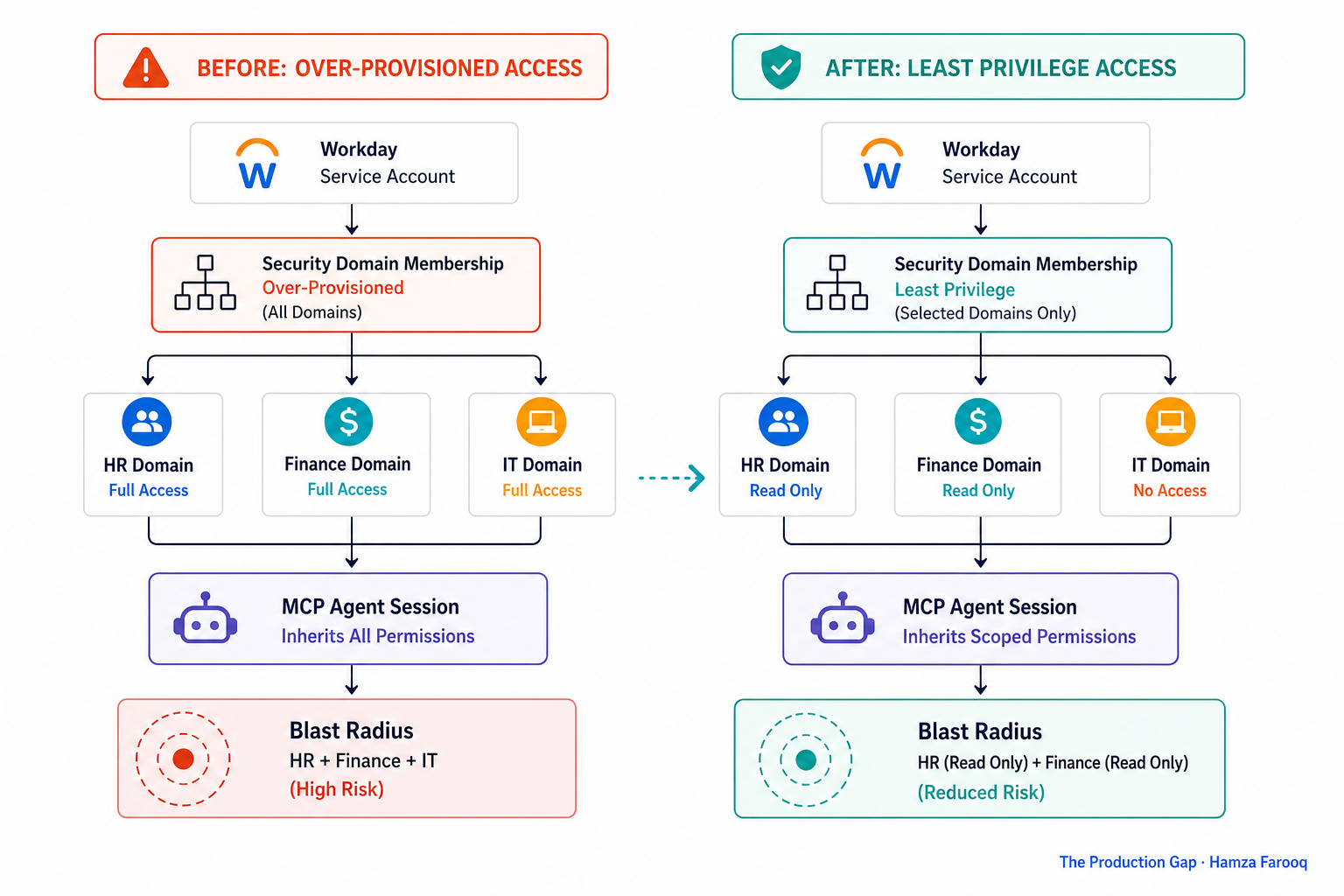
- Over-provisioned service accounts are the highest-risk starting condition: A broadly scoped account gives an autonomous agent far more access than any deliberate design would approve.
- Workday's audit trail has real gaps for headless actions: Native logs don't capture agent reasoning or orchestration context; supplemental logging is required for SOX and GDPR.
Introduction
Workday made its Agent-Ready Tools generally available in June 2026, allowing any MCP-capable agent to execute HR and finance transactions headlessly, at machine speed, with no human login required.
The problem most teams aren't addressing is organizational, not technical: the service accounts those agents will run under were often provisioned years ago, given broad access for convenience, and never scoped back. An autonomous agent inheriting an over-provisioned account carries the effective blast radius of a privileged insider that never logs out. This playbook gives architects a framework to move fast without moving recklessly.
What Exactly Are Agent-Ready Tools, and How Does the MCP Layer Work in Workday?
Workday's Agent-Ready Tools are pre-built, governed action endpoints that MCP agents call to execute HR and finance tasks without a human login; MCP is the protocol layer that lets external agent platforms connect to those endpoints in a standard schema.
When an external MCP agent connects to Workday, the session binds to a service account, that's when permission inheritance activates. The agent's effective entitlements become whatever that account holds. Workday enforces what the bound account has; it does not evaluate whether the agent should have a given entitlement. That judgment must happen before the agent ever connects.
MCP lets external agents (whether Claude-based orchestrators, GPT-based systems, or custom LLMs) describe tool calls in a standard schema and receive structured Workday responses. Workday uses MCP to support agent-to-agent communication in multi-agent systems. Any MCP-compatible platform can connect natively, which accelerates automation velocity and expands your attack surface by the same degree.
When Should You Use Native Agent-Ready Tools Versus a Custom Integration?
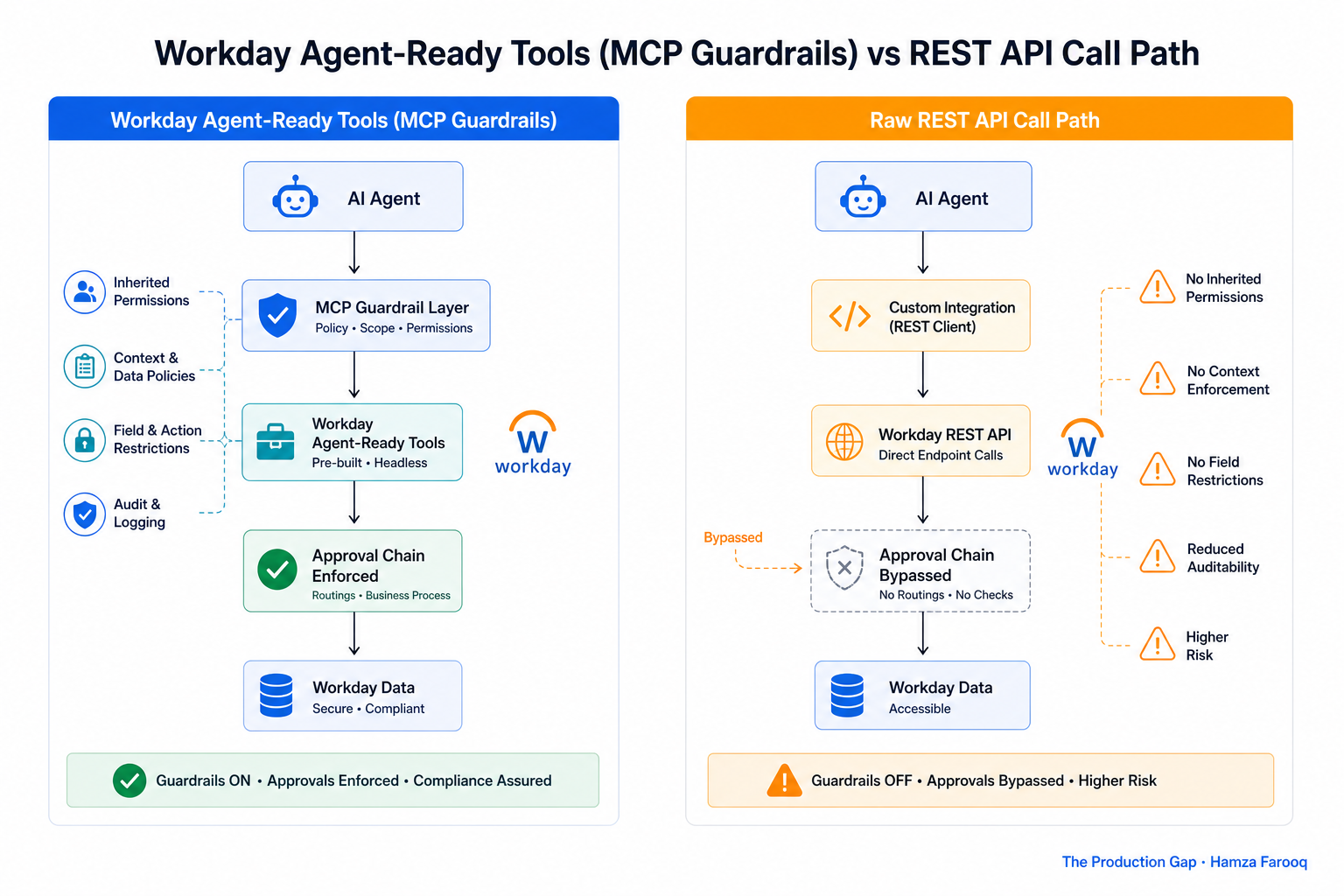
Use Agent-Ready Tools for standard HR or finance transactions with built-in approval chains; use complex reporting paths for cross-object analytics no pre-built tool addresses; build custom REST or SOAP only when a genuine capability gap forces it.
| Dimension | Agent-Ready Tools (MCP) | Complex Reporting Path | Custom REST/SOAP |
|---|---|---|---|
| Best for | Standard transactions: job changes, onboarding, compensation, journal entries | Complex cross-object reporting, ad hoc analytics on live data | Proprietary workflows, legacy system bridging |
| Guardrails | Built-in: approval chains, field validation, domain policies | None native; caller must enforce all governance | Fully custom; you build every guardrail |
| Maintenance burden | Low; Workday owns versioning | Medium; schemas evolve with releases | High; you own every breaking change |
| Audit coverage | Native Workday audit trail included | Query logging only | Depends on your implementation |
The approval-chain behavior built into a pre-built tool is a meaningful difference from a raw reporting path, which returns results without triggering those chains. Reporting paths carry no built-in controls, the full governance burden falls on the caller. Custom integrations are appropriate only when neither native option fits.
How Does the Inherited Permission Model Actually Work, and Where Does It Create Agent-Specific Risk?
When a Workday MCP agent acts under a service account, it inherits every security domain, role assignment, and approval bypass that account holds, making accumulated, unaudited entitlements the effective permission set of an autonomous agent executing continuously at scale.
Roles that bypass approval chains (common in integration accounts built to reduce friction at initial deployment) pass that bypass directly to the agent, with no human checkpoint anywhere in the chain. The permissions problem is organizational and predates the agent by years. Teams that treat MCP as a purely technical challenge discover this gap only after an agent has already acted on an entitlement no one consciously granted.
Workday MCP Pre-Deployment Checklist
- Enumerate security domains. Pull the domain-policy report for every service account you plan to delegate to an MCP agent.
- Audit against least-privilege. Map each domain against the agent's defined task list; remove any entitlement not required.
- Create agent-specific security groups. Do not reuse legacy integration accounts; create net-new groups scoped to the agent's function.
- Configure approval chains explicitly. For every write action in scope, confirm the approval chain is configured and will trigger from the agent's session.
- Test the permission boundary. Run the agent in a non-production environment and confirm it cannot exceed its defined scope.
- Register scope in your integration registry. Document agent identity, bound account, permitted domains, and approval chain configuration before production deployment.
- Schedule a revalidation cadence. Set a recurring review to catch entitlement drift before it compounds.
What Does the Workday Audit Trail Capture for Headless Agent Actions, and What Gaps Must Architects Close?
Workday records transaction data tied to service account identity, field-level changes, timestamps, and the tool endpoint invoked. It does not capture the prompt that caused the agent to act, the orchestration chain across multi-agent systems, LLM reasoning, or whether a human reviewed the action. SOX auditors want the full decision chain; GDPR reviewers need to trace lawful basis for accessing personal data to a specific, purposeful instruction. The native trail provides neither.
Some agentic capabilities that would help close this gap remain in early access. Do not design compliance-critical workflows that depend on features not yet confirmed as GA, treat them as a future enhancement path and document that assumption in your integration registry.
For regulated industries: capture the trigger event, agent identity, tool called, and human-readable intent before every Workday write action, stored in an immutable log outside Workday. The native audit trail is necessary but not sufficient.
Frequently Asked Questions
How does the Workday MCP permission model differ from a traditional integration system account? A traditional system account is passive, it responds when a scheduled job calls it, then stops. A Workday MCP agent is an active executor acting on LLM reasoning continuously, with every inherited entitlement available on demand around the clock, making over-provisioned entitlements significantly more dangerous than in any scheduled batch context.
What agentic capabilities are still in early access and how should architects design around them? Certain Workday agentic features remain in early access as of June 2026. Design current workflows to rely only on confirmed-GA capabilities, document the assumption explicitly in your integration registry, and treat early-access features as a future enhancement path rather than a dependency.
How do you harden a Workday service account before delegating it to an MCP agent? Follow the Workday MCP Pre-Deployment Checklist in this guide: enumerate every security domain the account touches, audit against the agent's specific task list, create a net-new security group for the agent identity, configure approval chains for every write action, test the boundary in non-production, register scope in your integration registry, and set a recurring revalidation cadence.
Conclusion
The Workday agentic platform is production-ready as of June 2026. Your security posture may not be, not at agent scale. The real integration decision isn't MCP versus custom; it's whether the service accounts you're about to delegate have ever been seriously audited against the tasks you're actually assigning.
Before your next sprint: pull the domain-policy report on every service account you plan to hand to an MCP agent and run it against the Pre-Deployment Checklist above. That audit is the one thing no vendor announcement will do for you.
Learn from me
Forward Deployed Engineering Bootcamp for Full-Stack Developers, my Maven cohort. Build and ship complete AI products end to end, from React and Node.js frontends to deployed models with caching and observability. Join the next cohort →
Hire us
Traversaal.ai. We're a team of forward deployed engineers solving the toughest AI problems for Fortune 100 companies: document intelligence, agentic data platforms, and real-time web intelligence, deployed in production. Work with our team to deploy your next agentic ecosystem. Talk to Traversaal.ai →
Join us
Want to solve these problems with us? We're always looking for forward deployed engineers who want to ship production AI. jobs@traversaal.ai