AI Agent Ownership Reassignment: How to Close the Offboarding Gap Before Agents Go Orphaned
AI agent ownership reassignment stops orphaned agents before they break. Learn governance rules, offboarding triggers, and Microsoft's native tooling.

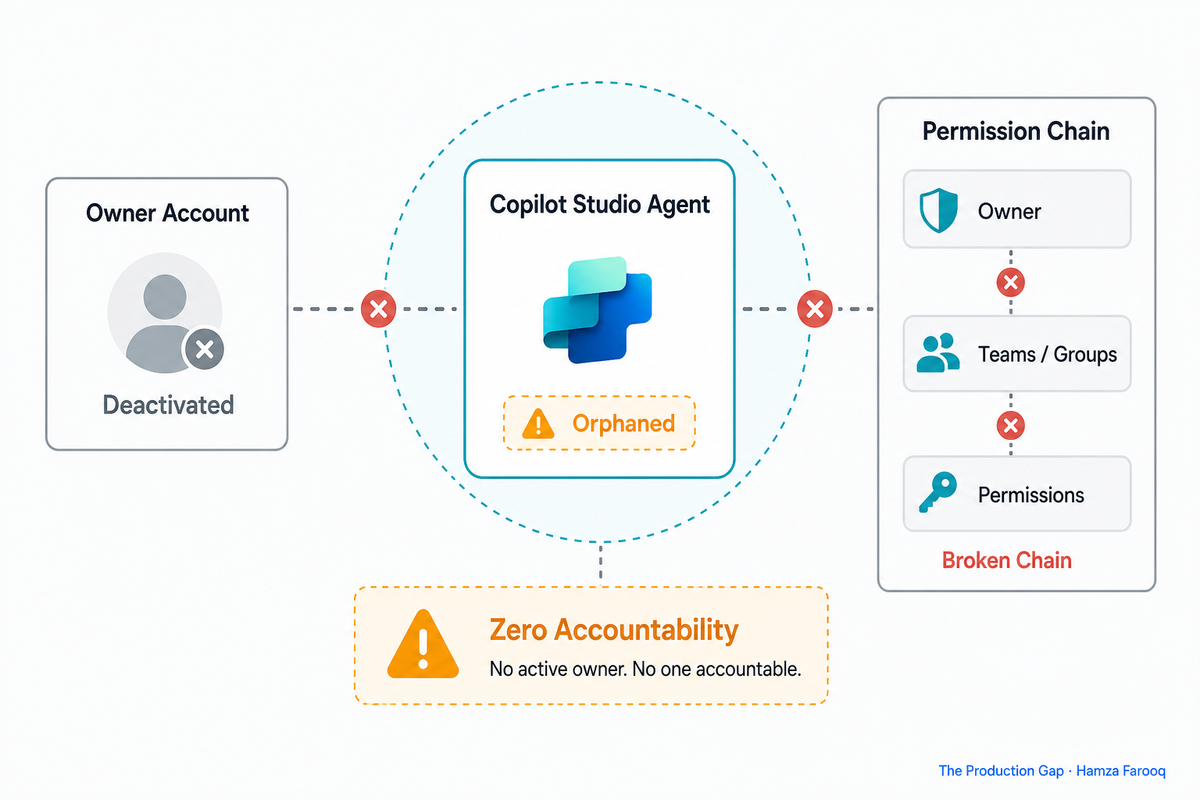
TL;DR: AI agent ownership reassignment is the process of transferring accountability for an autonomous agent to a new named owner before the original owner leaves or changes roles, and skipping it is how agents go orphaned. Every agent needs a documented owner of record and a defined reassignment trigger before it reaches production. Without both, offboarding any team member silently breaks your AI governance chain.
An employee leaves on a Friday. By Monday, three business-critical AI agents are running with no owner, no accountability chain, and no one who knows how to stop them, and your IT offboarding checklist still shows green.
Key Takeaways
- Orphaned agents are a governance failure: A deployed agent whose owner leaves keeps running with no one who can modify, share, or disable it.
- Individual-account ownership is a single point of failure: One routine offboarding can instantly break a business-critical workflow.
- Microsoft now ships native reassignment tooling: PowerShell for targeted fixes; Agent Management Rules for automated bulk handoffs.
- Agent Management Rules automate the handoff: Ownership routes to the departing owner's manager the moment their account deactivates.
- The offboarding checklist has a missing line item: IT tracks laptops and licenses (not AI agents) so production agents go ownerless until something breaks.
- Every agent needs an owner and a trigger before launch: No agent reaches production without a named owner and a configured reassignment rule.
Introduction
Enterprise AI agent deployment has moved faster than the governance frameworks meant to contain it. Orphaned Copilot Studio agents create emergency admin interventions instead of orderly handoffs, and the conditions that produce them are structural, not accidental.
The root problem is straightforward. The creator becomes the sole owner, and only this creator can grant permission for others to install or use the agent. One routine offboarding severs the entire permission and accountability chain overnight. The agent keeps running, and most organizations won't discover this until a workflow fails in production.
Microsoft has shipped native AI agent ownership reassignment tooling. The technical fix exists. What most organizations still lack is the governance layer that ensures the tooling actually fires.
What is an orphaned agent, and why does individual account ownership produce them?
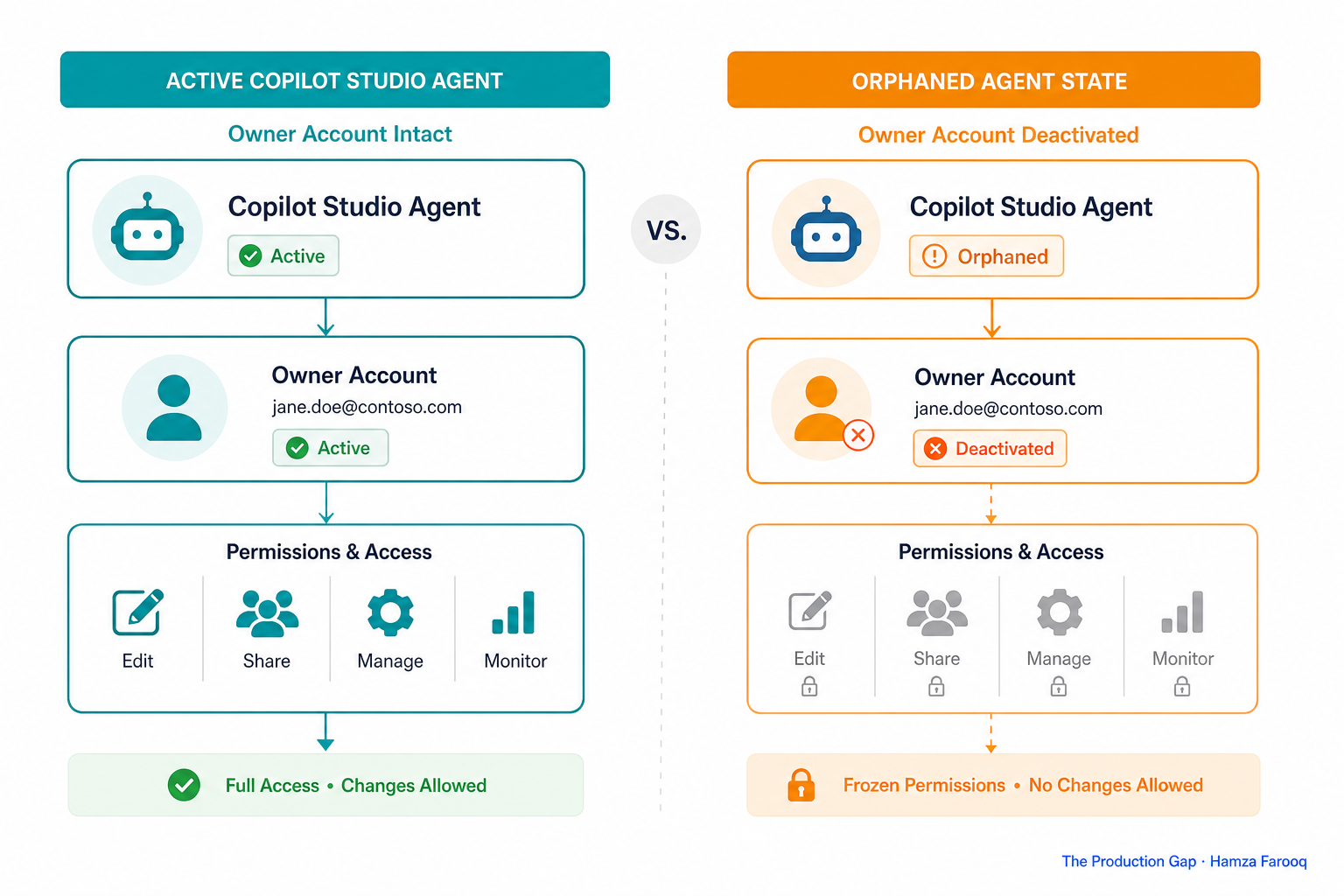
An orphaned agent is a deployed AI agent whose owner account has been deactivated, leaving it running in production with no one who can modify, share, disable, or take accountability for it.
The agent may still function for existing users (which obscures the problem until it compounds. You must be an agent owner to share an agent and assign the agent viewer role. When the owner leaves, those controls become a lock with no keyholder, frozen in its last configured state until an admin intervenes) assuming anyone notices.
Individual-account ownership creates a single point of failure. Consider an illustrative scenario consistent with this ownership model: a developer ships a Copilot Studio agent in Q2, resigns in Q3, and IT offboards the account. The team still uses the agent daily, but the permission chain is frozen and no one can touch it. (Illustrative scenario; specific role and tooling details are representative, not verified case data.)
The orphaned state is not an edge case. It is the default outcome of individual-account ownership when governance is absent.
What reassignment tooling does Microsoft now ship, and what is each method's scope?
Microsoft provides two native paths: a PowerShell method for targeted cases, and Agent Management Rules for automated bulk reassignment.
Path 1, PowerShell reassignment (reactive, surgical)
A step-by-step PowerShell guide exists for Power Platform admins to reassign Copilot Studio agent ownership. Reach for it when an admin discovers a specific orphaned agent and needs to act immediately. Critical limitation: it requires admin awareness that the agent exists. PowerShell cannot find what was never registered.
Path 2, Agent Management Rules (proactive, scalable)
Agent Management Rules support bulk reassignment of orphaned agents to the previous owner's manager. This fires automatically on account deactivation, no admin intervention required. Key dependency: the manager-escalation logic only works if the org chart in Entra ID is accurate. A stale org chart produces a failed handoff just as surely as no rule at all.
Method comparison
| Method | Scope | Trigger | Admin Action Required | Key Dependency |
|---|---|---|---|---|
| PowerShell reassignment | Individual / targeted | Manual, post-discovery | Yes, admin must run script | Admin must know agent exists |
| Agent Management Rules | Bulk / automated | Account deactivation event | No, fires automatically | Accurate org chart in Entra ID |
| Manual share via UI | Single agent, pre-offboarding | Owner must be active | Yes, owner takes action | Owner must act before deactivation |
Both methods are necessary. Agent Management Rules are the standing safety net; PowerShell is recovery for agents that slip through. Neither eliminates the need for an agent registry.
Why does shipping reassignment features still fail to close the offboarding gap?
The underlying problem is a governance classification failure: organizations track AI agents like software licenses rather than accountable assets with defined owners, so the accountability gap opens before any platform feature can fire.
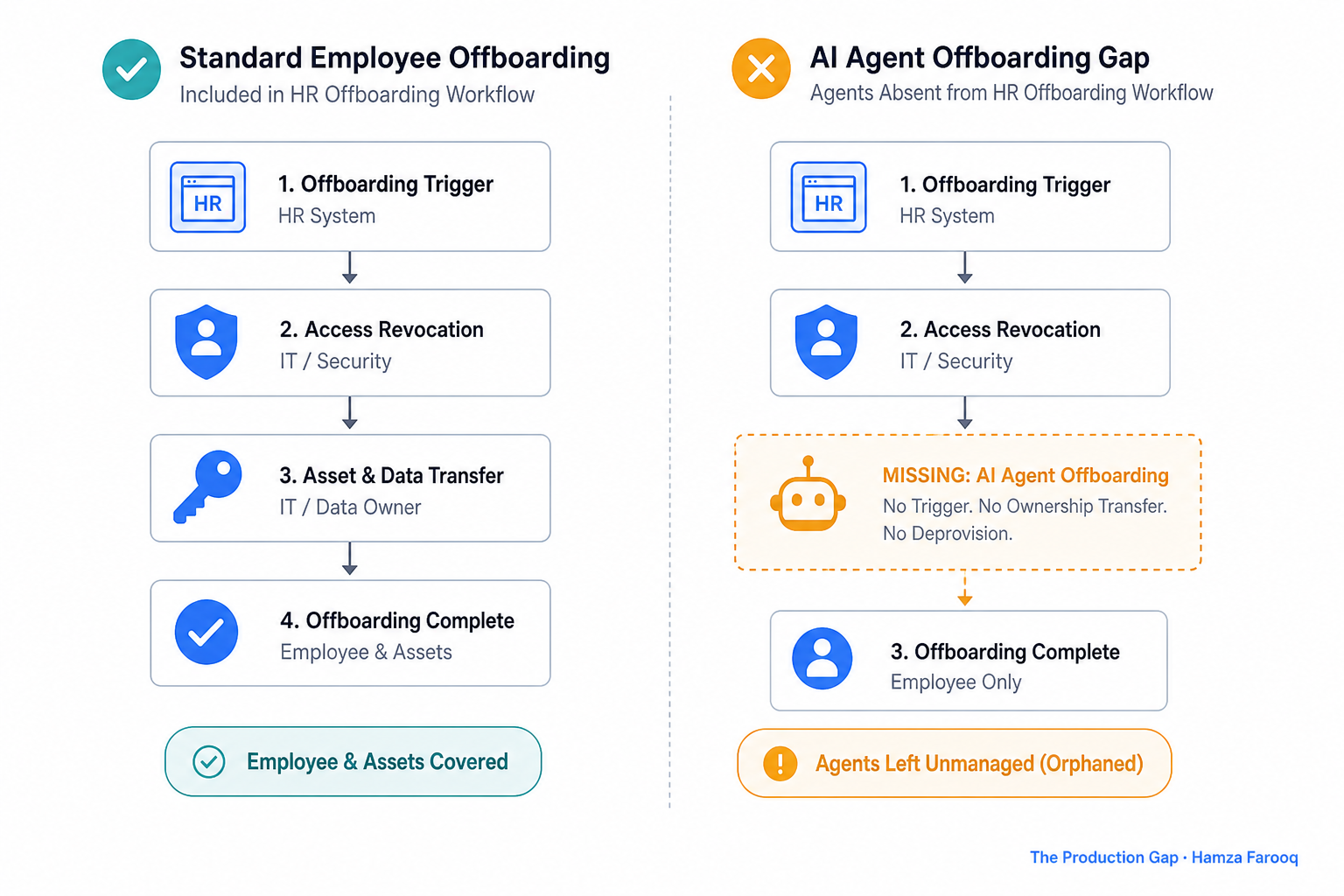
Standard offboarding workflows fire from HR system triggers and reach the assets those systems track, accounts, licenses, access credentials. AI agents live in Copilot Studio deployment records that no standard offboarding checklist reads. Platform features fire downstream. The accountability gap opens upstream, before those features have a chance to run.
In my view, the real fix requires forcing agent registration into the same offboarding workflow that deactivates an account, not downstream in a script run by an admin who noticed something broken weeks later. Until agents are treated as accountable assets with named owners and exit procedures, the technical tooling will remain a partial answer.
What should an offboarding checklist include for every AI agent before it reaches production?
Every agent should have three things before production: a named owner in a centralized agent registry, a documented reassignment trigger tied to account deactivation, and an Agent Management Rule configured to route ownership automatically.
The pre-production agent governance checklist
| Checklist Item | Requirement | Responsible Party | Verified Before Launch? |
|---|---|---|---|
| Named owner of record | Documented in centralized agent registry | Developer / Power Platform Admin | ☐ |
| Reassignment trigger | Tied to owner's Entra ID account deactivation | IT / Power Platform Admin | ☐ |
| Agent Management Rule configured | Routes to owner's manager automatically | Power Platform Admin | ☐ |
| PowerShell break-glass procedure | Documented fallback for agents outside AMR coverage | Power Platform Admin | ☐ |
| Org chart accuracy confirmed | Owner's manager verified in Entra ID | HR / IT | ☐ |
| Agent registry entry | Owner, purpose, and criticality documented | Developer | ☐ |
| HR offboarding workflow integration | Agent registry is a readable input to the offboarding trigger | IT / HR | ☐ |
A centralized agent registry is the missing infrastructure for most organizations. What matters most is integration: the registry must be readable by the offboarding workflow so ownership handoffs trigger automatically rather than after discovery. Test your Agent Management Rule before launch, a misconfiguration caught in testing is a configuration problem; the same misconfiguration caught in production is an incident.
FAQ
What happens to a Copilot Studio agent when its owner's account is deactivated?
The agent enters an orphaned state (it may keep running for existing users, but no one can modify, share, or disable it. The creator is the sole owner and the only person who can grant permission for others to install or use the agent) producing a live workflow dependency with no accountable party.
How do Power Platform admins identify and bulk reassign ownerless agents?
Use Agent Management Rules to automatically bulk reassign orphaned agents to the departing owner's manager on account deactivation; for agents discovered after the fact, the PowerShell path handles individual cases. Both require a centralized registry, visibility is a prerequisite for either method to work reliably.
Why is individual-account ownership in Microsoft 365 Copilot agents a governance risk?
One account deactivation severs the permission and accountability chain for every agent that person owned. You must be an agent owner to share an agent and assign the agent viewer role, no one else can transfer, modify, or shut it down without admin intervention, which requires knowing the agent exists in the first place.
What should an offboarding checklist include for AI agents?
Three things before production: a named owner in a centralized registry the offboarding workflow can read, a configured Agent Management Rule routing ownership to the departing owner's manager, and a documented PowerShell break-glass procedure for agents outside automated coverage.
Conclusion
The tooling is available. Agent Management Rules automate the handoff. PowerShell provides the break-glass path. The gap is classification: agents need named owners, defined scope, and documented exit procedures, the same accountability structures applied to any other business-critical asset.
Two actions to take now:
- Before the next agent ships, register it in your agent registry and configure an Agent Management Rule pointing to the owner's manager in Entra ID.
- This week, add "AI agent registry check" as a named line item in the standard employee offboarding checklist, before the next resignation forces the issue.
The offboarding checklist already knows how to deactivate an account. It just needs a line for handing off the agents that account owned.
Learn from me

Forward Deployed Engineering Bootcamp for Full-Stack Developers, my Maven cohort. Build and ship complete AI products end to end, from React and Node.js frontends to deployed models with caching and observability. Join the next cohort →
Hire us
Traversaal.ai. We're a team of forward deployed engineers solving the toughest AI problems for Fortune 100 companies: document intelligence, agentic data platforms, and real-time web intelligence, deployed in production. Work with our team to deploy your next agentic ecosystem. Talk to Traversaal.ai →
Join us
Want to solve these problems with us? We're always looking for forward deployed engineers who want to ship production AI. jobs@traversaal.ai